Top 10 SaaS Features Every SaaS Product Must Have in 2026
- 1 Top 10 SaaS Features Every SaaS Product Must Have in 2026
- 1.1 Key Takeaways
- 1.2 What Is a SaaS Product?
- 1.3 What Makes a Successful SaaS Product?
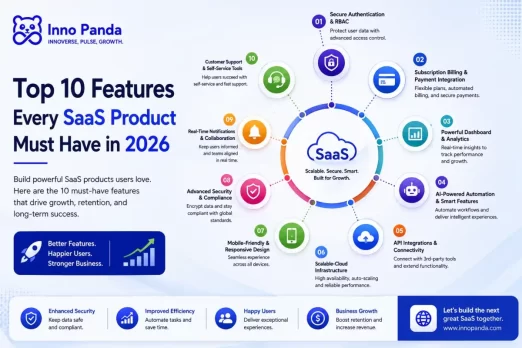
- 1.4 Top 10 SaaS Features Every SaaS Product Must Have in 2026
- 1.4.1 1Secure User Authentication & Role-Based Access Control
- 1.4.2 2Subscription Billing & Payment Gateway Integration
- 1.4.3 3Powerful SaaS Dashboard Features & Analytics
- 1.4.4 4AI Features for SaaS: Automation & Smart Recommendations
- 1.4.5 5API Integrations & Third-Party Connectivity
- 1.4.6 6Scalable Cloud Software Features
- 1.4.7 7Mobile-Friendly & Responsive SaaS Application Features
- 1.4.8 8Advanced Security & Compliance
- 1.4.9 9Real-Time Notifications & Collaboration
- 1.4.10 10Customer Support & Self-Service Tools
- 1.5 Bonus SaaS Platform Features That Give You a Competitive Edge
- 1.6 SaaS Product Checklist for Product Owners
- 1.7 How to Prioritise SaaS Features for Your MVP
- 1.8 Future Trends in SaaS Product Design & Development (2026 and Beyond)
- 1.9 SaaS Software Development Guide: Where to Start
- 1.10 Why Choose Inno Panda for Custom SaaS Development
- 1.11 Quick Glossary: SaaS Feature Terms Explained
- 1.12 Frequently Asked Questions
- 1.13 Not Sure Which SaaS Features Your Product Actually Needs?
- 1.14 Related Reading
Users don't compare SaaS products on paper anymore. They compare them on how fast the product proves its worth. Here are the SaaS features that actually decide whether someone signs up, sticks around, or quietly cancels.
Key Takeaways
- Ten SaaS features cover the base every product needs: login, billing, dashboard, AI, integrations, cloud, mobile, security, notifications, and support.
- Not every feature belongs in your first release. Your MVP needs a small, focused set, not all ten at once.
- AI is now expected in most SaaS categories, but one well-scoped AI feature beats five half-built ones.
- Security and compliance aren't optional extras. Skipping them early usually costs more to fix later.
- The SaaS products winning in 2026 pair strong core features with fast, focused product development, not a longer feature list.
What Is a SaaS Product?
Quick answer: A SaaS product is software you use over the internet. No install, no CD, no server on your end. You log in through a browser, pay a monthly fee, and the provider handles hosting, updates, and upkeep.
That's the whole model in plain terms. No CD, no download, no server to manage on your end. You open a browser, log in, and the software just works. Gmail, Slack, and Shopify all follow this pattern. So does almost every tool a modern business runs on.
Why does this matter for a features list? Because SaaS products live or die on retention, not a one-time sale. A customer can cancel next month if the product stops earning its keep. That single fact shapes which Software as a Service features actually matter: the ones that keep proving value every day, not just the ones that look good on a features page.
What Makes a Successful SaaS Product?
Quick answer: A successful SaaS product solves one problem well, proves its value fast, and keeps working without friction. The right SaaS features make that possible. The wrong ones just add weight.
Every SaaS founder wants a long feature list. Users don't. They want the product to work the moment they log in, and they want it to keep working every day after that. That gap between what founders build and what users actually value is where most SaaS products lose people.
In 2026, that gap has narrowed. Users have used dozens of SaaS tools by now. They know what good looks like: fast onboarding, a clean dashboard, and a product that doesn't make them think twice before trusting it with their data. Modern SaaS features are less about doing more and more about doing the essentials well.
Why SaaS Product Features Matter More Than Ever
The SaaS market is crowded. Most categories now have five, ten, sometimes twenty products doing roughly the same job. When products look similar on the surface, the features underneath decide who wins the trial and who gets uninstalled after a week. Strong SaaS platform features don't just add convenience. They lower support tickets, cut churn, and give your sales team something concrete to demo instead of a promise.
This shows up fastest at the trial stage. A user who can't log in smoothly, can't see their data clearly, or hits a payment error rarely files a support ticket. They just leave and try a competitor instead. The SaaS features that matter most aren't always the flashiest ones. Often, they're the boring, reliable parts, like login, billing, and the dashboard, working exactly as expected every single time.
Common Mistakes in SaaS Product Development
Most SaaS product development mistakes trace back to one habit: building for every possible user before proving value for one clear user. Here's what that usually looks like in practice.
Adding features before proving demand. Every extra feature adds cost, testing time, and one more thing that can break, before you know if anyone wants it.
Copying a competitor's feature list. A feature that works for their users won't automatically work for yours. Build for your own customer, not their roadmap.
Treating security as a later problem. Adding login checks, encryption, or compliance after launch is slower and costs more. Build it in from day one instead.
Skipping analytics until it's too late. Without usage data, you're guessing which SaaS features matter to your users. Data tells you. Guessing doesn't.
Top 10 SaaS Features Every SaaS Product Must Have in 2026
These ten cover the core features of SaaS applications. Think of them as the foundation every serious SaaS product needs, regardless of industry or niche.
1Secure User Authentication & Role-Based Access Control
Secure SaaS application features start here, at the login screen. It's the first thing a user touches and the first thing that needs to earn their trust. Multi-factor authentication (MFA) adds a second check beyond a password, which matters the moment your product holds anything sensitive. Single sign-on (SSO) lets business customers log in with the identity system they already use, which is often a hard requirement for enterprise deals. And role-based access control makes sure a support rep, a finance admin, and a regular user each see only what they should. Get this wrong, and it's not just a bug. It's a trust problem.
2Subscription Billing & Payment Gateway Integration
Billing is where good intentions meet real money. It needs to be right the first time. Flexible pricing plans let you serve a solo user and a large account without building two separate products. Automated billing handles renewals, upgrades, downgrades, and failed payments on its own. No one on your team needs to touch a spreadsheet. And solid payment gateway integration, through Stripe, PayPal, or regional options, keeps checkout smooth for customers wherever they're based.
3Powerful SaaS Dashboard Features & Analytics
A SaaS dashboard is often the only part of your product a user sees every single day, so it carries a lot of weight. A clear KPI dashboard should answer "is this working for me?" in under five seconds. Custom reports let power users dig into their own data instead of asking your support team to pull it manually. And real-time data visualisation turns raw numbers into something a busy user can actually act on.
4AI Features for SaaS: Automation & Smart Recommendations
AI features for SaaS have gone from nice-to-have to expected in most categories. But the winning approach is narrow, not broad. An AI assistant built into the workflow, drafting a reply or summarising a record, saves more time than a chatbot stuck in the corner of the screen. Predictive analytics flags problems, like a customer likely to churn, before a person would notice. Workflow automation removes the repeat steps between a trigger and an outcome. One AI feature that solves a real problem beats five shallow ones every time.
5API Integrations & Third-Party Connectivity
No SaaS product lives on its own. Customers already use a CRM, an ERP, a support tool, and a dozen smaller apps. They expect your product to connect to that stack. Open REST APIs let developers build on top of your platform. Native CRM and ERP integrations remove manual data entry, which quietly pushes users toward a rival tool. Webhooks let your product tell other tools the moment something important happens, so nobody has to check back manually.
6Scalable Cloud Software Features
Growth should be a good problem, not an outage. High availability keeps your product running even if one server has an issue. Auto-scaling infrastructure adds capacity on its own when traffic spikes. No one gets paged at 2am. Ongoing performance work keeps load times fast as your users and data grow. A product that gets slower as it succeeds is a product people start to leave.
7Mobile-Friendly & Responsive SaaS Application Features
A good share of your users will open your product on a phone at some point, often to check something quickly between meetings. Cross-device compatibility means the experience holds up on a laptop or a phone alike. A progressive web app gives you app-like speed and offline resilience, without the cost of building separate native apps. Where the use case justifies it, native mobile apps unlock push notifications and deeper device features.
8Advanced Security & Compliance
Security and compliance close deals as often as they stop problems. Encrypting data, both moving and stored, is the baseline now, not a bonus. GDPR rules apply the moment you have European users. PDPA rules apply the moment you handle Singapore customer data. Certifications like SOC 2 and ISO 27001 aren't just checkboxes either. For B2B buyers, they're often the difference between a signed contract and a stalled one.
9Real-Time Notifications & Collaboration
Users forget things that happen outside their inbox. That's exactly why notifications matter. Email notifications handle the things that need a paper trail. Push notifications catch time-sensitive updates on mobile. Built-in team collaboration, comments, mentions, and shared views, keeps a whole account working inside your product. Nobody needs to copy data into a separate chat thread.
10Customer Support & Self-Service Tools
How a product handles a confused or frustrated user says a lot about how it will treat them long-term. Live chat catches the moment someone's about to give up. AI chatbots handle the repeat questions instantly, any time of day. And a solid knowledge base or help centre lets most users solve their own problem without waiting on a reply at all, which is usually what they'd prefer anyway.
Bonus SaaS Platform Features That Give You a Competitive Edge
Once the core ten are solid, these extras start to matter, especially if you're selling to larger customers or moving into new markets.
SaaS Product Checklist for Product Owners
Use this SaaS platform development checklist as a quick gut-check before you call a release "feature complete."
How to Prioritise SaaS Features for Your MVP
Ten features is the full picture, not the starting line. The best SaaS features for startups are the smaller set your MVP actually needs, chosen with a clear head.
| Priority | What Goes Here |
|---|---|
| Must-Have | Secure login, one core workflow, basic billing, a simple dashboard, essential integrations |
| Nice-to-Have | Advanced reporting, extra integrations, richer permissions, a first AI feature |
| Future Enhancement | White-labelling, multi-tenant architecture, deep localisation, native mobile apps |
A good rule of thumb: if a feature doesn't help a new user reach their first "aha" moment, it can wait. SaaS MVP features exist to prove the product works, not to impress a spec sheet. Once real users are active, usage data will tell you which "nice-to-have" features to build next, instead of you guessing.
Future Trends in SaaS Product Design & Development (2026 and Beyond)
The ten features above are today's baseline. Here's where modern SaaS software features are headed next, and what it means for your SaaS application development roadmap.
AI-Native SaaS
Older products bolt AI onto the side, usually as a chatbot button in the corner. AI-native SaaS builds it into the core workflow from day one. The assistant doesn't sit apart from the product. It's part of how the product works, drafting, summarising, and suggesting the next step as the user moves through their task. This shift is already changing how SaaS product design gets approached at the whiteboard stage, not just at launch.
Agentic AI Integration
Instead of one AI trying to do everything, expect small, specialised AI agents handling one job each. One agent checks new leads against your ideal customer profile. Another chases overdue invoices. A third flags a support ticket that needs a human. A person still reviews anything sensitive, like a refund or a contract term. This human-in-the-loop setup is what makes agentic AI practical for most SaaS teams right now, rather than a full hands-off system.
Low-Code & No-Code Platforms
Low-code and no-code tools are changing who gets to shape a SaaS product. A non-technical team member can adjust a workflow, build a form, or tweak an automation without opening a ticket for the engineering team. For SaaS product development teams, this means faster iteration and fewer small requests clogging up the sprint. It doesn't replace custom development. It just moves the small stuff out of the way.
Hyperautomation
Basic automation handles one step, like sending an email. Hyperautomation links several steps into one process that runs on its own, start to finish. An invoice arrives. It gets matched, approved, and paid. No person touches it at any point. It's the next step for SaaS platforms that have already automated the easy, obvious tasks and want to go further.
Voice Interfaces
Voice is a small trend today, but it's a real one, especially on mobile. Instead of tapping through three menus, a user says what they want and the product does it. It won't replace the dashboard any time soon, but as a shortcut for quick, common actions, it's already showing up in more SaaS application features than most product teams expected this early.
Predictive Analytics
Most dashboards today report what already happened. Predictive analytics flags what's likely to happen next, before a person would catch it manually. Think churn risk on a specific account, a deal that's gone quiet, or a support ticket volume spike about to hit. For SaaS teams, that's the difference between reacting to a problem and getting ahead of it. Expect this to become a standard SaaS dashboard feature, not a premium add-on, as the underlying models get cheaper to run.
SaaS Software Development Guide: Where to Start
Knowing which SaaS features you need is one thing. Building them in the right order is another. Most teams that get this wrong don't fail because of bad code. They fail because they built the wrong things first, in the wrong sequence.
Start With Discovery, Not the Feature List
Before any SaaS application development work begins, spend time on the basics: who is the user, what single problem are you solving for them, and what does success look like in their day-to-day work? A short discovery phase, even just a week or two, saves months of rework later. It's also where you decide your tech stack, your hosting setup, and which of the ten features actually need to exist on day one.
Build vs Buy: Off-the-Shelf Tools vs Custom SaaS Product Development
| Off-the-Shelf Tools | Custom SaaS Product Development | |
|---|---|---|
| Speed to launch | Fast, plug-and-play | Slower, but built around your exact workflow |
| Flexibility | Limited to what the tool already supports | Shaped entirely around your product and users |
| Ownership | You rent the platform | You own the code, the data, and the roadmap |
| Best for | Testing an idea before committing budget | A product that's core to your business long-term |
Neither option is automatically right. If you're still validating demand, an off-the-shelf tool or a lightweight no-code build can get you real user feedback fast. Once you know the product has legs, custom SaaS development usually pays for itself, because you're no longer working around someone else's limits.
Why Choose Inno Panda for Custom SaaS Development
We're a Singapore-based agency. We build the SaaS features covered in this guide. We don't just write about them. Our SaaS Development team handles the full stack: secure login, billing, dashboards, and the cloud setup underneath. We pair that with AI Automation & Integration for AI features that earn their place, and API Development for the integrations your customers expect on day one.
If you're building from scratch, our Custom Software Development team covers everything: MVP scoping, full platform builds, and support once you're live. Businesses across Singapore, Malaysia, Indonesia, and the Philippines choose us for one reason. We scope the features that matter first, before writing a line of code.
Quick Glossary: SaaS Feature Terms Explained
A fast reference for the terms in this guide. Useful if you're sharing this with a non-technical co-founder or a stakeholder.
- MVP (Minimum Viable Product)
- The smallest working version of a SaaS product that proves it solves a real problem for real users.
- RBAC (Role-Based Access Control)
- A system that gives each user type, like admin, editor, or viewer, only the access they actually need.
- SSO (Single Sign-On)
- Lets a user log in once through an identity provider their company already uses, instead of a separate password.
- Multi-Tenant Architecture
- One codebase serving many customer accounts, with each customer's data kept fully separate from the others.
- PWA (Progressive Web App)
- A web app that behaves like a native mobile app, including offline access, without needing an app store download.
- Hyperautomation
- Automating an entire business process end to end, rather than automating only one isolated step in it.
Frequently Asked Questions
What are the essential features of a SaaS product?
Secure login, billing, a dashboard, core integrations, mobile-friendly design, and support cover the essentials. Everything else, like AI or white-labelling, sits on top of that base.
What should a SaaS MVP include?
A SaaS MVP needs secure sign-up, one core workflow, a basic dashboard, simple billing, and a way to collect feedback. Advanced reporting, deep integrations, and AI features can usually wait until you have real usage data.
Which SaaS features improve customer retention?
Fast onboarding, a dashboard that shows value quickly, reliable notifications, and responsive support move retention the most. Users stay when a product proves its worth early and keeps working without friction.
How much does SaaS development cost?
Cost depends on scope. A lean MVP with a handful of core features costs far less than a full platform with AI, multiple integrations, and enterprise security. Most teams get a realistic number after a short discovery and scoping session.
How long does it take to build a SaaS product?
A focused MVP can often launch in a few months. A fuller product with billing, integrations, and AI features usually takes longer, since each layer needs its own testing before it goes live.
Which payment gateways should a SaaS platform support?
Most SaaS platforms start with Stripe or PayPal for global reach. Then they add regional gateways based on where their customers are. Local payment methods usually matter more for conversion than adding more global options.
Is AI necessary for SaaS products in 2026?
AI is not necessary for every SaaS product, but it is now expected in most categories. The safer approach is adding one well-scoped AI feature that solves a real problem, rather than bolting on AI for the sake of it.
How can businesses scale a SaaS platform?
Scaling means your cloud setup adds capacity on its own as traffic grows. Your codebase and database need to handle more users without a rebuild. Test performance before you need the extra capacity. That is what prevents outages later.
Not Sure Which SaaS Features Your Product Actually Needs?
We help founders and product teams scope the right SaaS features for their MVP or full platform. Then we build it, for businesses across Singapore, Malaysia, Indonesia, and the Philippines.