What Is eCommerce Automation? How It Works and Helps Your Business Grow
- 1 What Is eCommerce Automation? How It Works and Helps Your Business Grow
- 1.1 Key Takeaways
- 1.2 What Is eCommerce Automation?
- 1.3 Why eCommerce Automation Matters for Growing Businesses
- 1.4 How eCommerce Automation Helps Your Business
- 1.5 What Can You Automate in an eCommerce Business?
- 1.6 eCommerce Automation Across Different Business Stages
- 1.7 ecommerce automation software and tools
- 1.8 How to Start Automating Your eCommerce Business
- 1.9 Common Mistakes to Avoid When Automating Your Store
- 1.10 Quick Glossary
- 1.11 Frequently Asked Questions
- 1.12 Ready to See Where Automation Fits Your Business?
If you're still updating stock by hand, chasing shipping labels one order at a time, or answering the same "where's my order" message all day, this guide breaks down what ecommerce automation actually is, how it works, and exactly how it helps a business like yours grow without adding headcount.
Key Takeaways
- Ecommerce automation replaces manual, repetitive store tasks like order processing, stock updates, and customer notifications with automatic workflows.
- It helps businesses save staff time, cut order errors, prevent overselling, and respond to customers faster, without hiring more people.
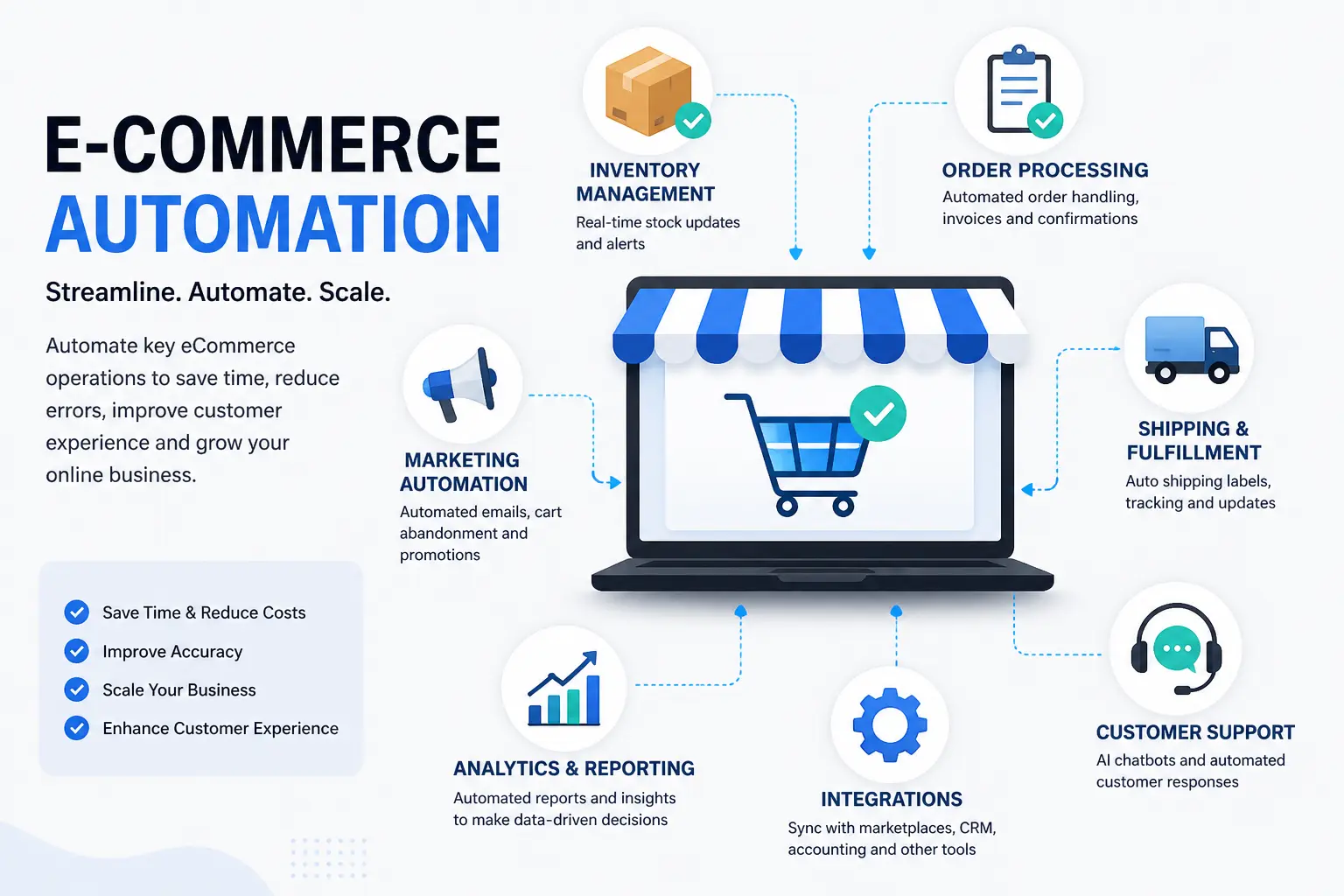
- The main areas businesses automate are order processing, fulfillment, inventory sync, customer support, marketing, and accounting.
- Fulfillment automation, getting orders picked, packed, and shipped, is often the part with the most direct effect on customer experience.
- Most businesses get the best return by automating one high-friction workflow first, then adding more in phases.
- You don't need an enterprise budget to start. No-code tools, purpose-built platforms, and custom integration all serve different stages of growth.
This guide covers the full picture in plain, everyday language: what ecommerce automation actually means, how it works behind the scenes, the real benefits it brings, the specific workflows most stores automate first, and how to get started without overhauling everything at once. It's written from what we see building automation systems for online stores across Singapore and Southeast Asia every day, not just theory.
What Is eCommerce Automation?
Ecommerce automation is the use of software to handle repetitive, rule-based tasks in an online store automatically, without someone doing them manually each time. Instead of a person checking every order, updating stock in a spreadsheet, and typing out a shipping notification, connected software does it the moment an order comes in.
Put simply, it's the difference between a business that runs on people repeating the same clicks all day, and a business where the software does the repeating so people can focus on the parts that actually need judgment, like handling a tricky customer issue or deciding what to stock next season.
How eCommerce Automation Actually Works
Automation works by connecting the systems your store already touches, your storefront, payment gateway, courier, inventory system, and accounting software, through APIs or an automation platform. When a trigger happens (a customer places an order, stock drops below a threshold, a delivery is marked complete), a pre-set workflow runs on its own. No one has to log in and push a button.
A basic example: a customer buys a product on Shopee. An automated system validates the payment, deducts the stock from every channel you sell on, generates a shipping label, and sends the customer a tracking link. That entire sequence, which might take a staff member several minutes per order, happens in seconds.
eCommerce Automation vs. Manual Operations
Here's the simplest way to picture it side by side. In a manual setup, a person touches every single step. In an automated one, the software does.
| Step | Manual Operations | Automated Operations |
|---|---|---|
| New order comes in | Someone checks the dashboard and enters it into a spreadsheet | Order is logged and validated instantly, no one has to check |
| Stock update | Updated by hand, often once a day across each channel | Synced in real time across every channel the moment a sale happens |
| Shipping label | Booked manually with the courier, one order at a time | Generated automatically as soon as payment is confirmed |
| Customer update | Sent manually, if there's time | Sent automatically the moment order status changes |
| What happens at higher volume | Manual touches grow in a straight line with order volume | Runs the same way whether it's 20 orders a day or 200 |
That last row is really the whole point. Manual operations work fine at low volume. The moment your orders start climbing, the number of manual touches climbs right along with them, but your team's time doesn't stretch to match. Automation is what breaks that link.
Why eCommerce Automation Matters for Growing Businesses
Most founders don't set out to automate. They start doing everything by hand because the business is small enough that it works. The problem shows up later, usually right when the business is finally gaining traction, and manual processes that used to be manageable start actively holding growth back.
The Real Cost of Manual eCommerce Operations
The cost isn't only the hours your team spends copying data between systems. It's what that time isn't being spent on instead, like following up with customers, improving product listings, or actually looking at what's selling. It's also the mistakes that manual work inevitably introduces: a stock count that's a day out of date, an order that gets missed overnight, a customer who emails twice because no one replied the first time.
There's also a quieter cost that's easy to miss: decision-making speed. When your stock and sales data live across five spreadsheets updated at different times, you're not really looking at your business, you're looking at last week's version of it. That gap makes it harder to catch a stockout before it happens or spot a product that's suddenly trending, until the moment has already passed.
Signs Your Business Needs Automation
How eCommerce Automation Helps Your Business
This is really the question behind the question. It's not just "what is it," it's "what does it actually do for me." Here's where the impact shows up in practice.
It Saves Time and Reduces Manual Work
The most immediate benefit is time. When order processing, stock updates, and notifications run automatically, your team stops repeating the same clicks dozens of times a day. That time goes back into things software can't do, like product strategy, customer relationships, and sourcing.
It Prevents Overselling and Inventory Errors
When stock syncs in real time across every channel you sell on, a sale on one platform instantly updates your available stock everywhere else. That single fix removes one of the most common and expensive mistakes in multichannel selling: selling something you no longer have.
It Improves Order Accuracy and Fulfilment Speed
Automated workflows don't get tired, distracted, or make typos. Orders get processed the same accurate way every time, and fulfilment starts the moment a payment is confirmed instead of whenever someone next checks the dashboard.
It Strengthens Customer Experience and Support
Automatic order updates and a support system connected to real order data mean customers get answers immediately, at any hour, without waiting on a reply. A chatbot built around your actual order data can handle most "where's my order" questions on its own, so your team is free to focus on the small number of cases that genuinely need a person.
It Gives You Real-Time Business Visibility
With everything connected, you can see accurate sales, stock, and fulfilment data as it happens, instead of piecing it together from spreadsheets updated a week apart. That means decisions about reordering, pricing, and promotions are based on what's actually happening now.
What Can You Automate in an eCommerce Business?
Automation isn't one single tool, it's a set of workflows that can be introduced gradually across different parts of the business.
Order Processing Automation
Covers payment validation, stock deduction, and accounting entries, all triggered automatically the moment an order is confirmed. For multichannel sellers, this usually also means pulling orders from every platform into a single queue, so your fulfilment team packs and ships from one list instead of switching between four separate seller dashboards throughout the day.
eCommerce Fulfillment Automation
Fulfillment automation is what happens right after an order is confirmed, and it's the part customers feel most directly, since it decides how fast their package actually shows up. Instead of someone manually picking a courier and booking a label for every order, the system does it based on rules you set: weight, destination, delivery speed, or cost.
A well-set-up fulfillment workflow usually covers:
For businesses shipping across Singapore and neighbouring SEA markets, this matters even more, since a single order might need different courier rules depending on whether it's going to a local address or crossing a border into Malaysia or Indonesia.
Inventory and Stock Sync Automation
Keeps stock levels accurate across every channel in real time, so a sale on one platform is instantly reflected everywhere else.
Customer Support Automation
Handles common, repetitive queries, like order status and delivery timing, automatically, and hands off only the cases that genuinely need a human.
Marketing and Retention Automation
Includes automatic cart abandonment follow-ups, post-purchase review requests, and low-stock reorder alerts sent to customers or your team without manual triggering.
Accounting and Reporting Automation
Connects your payment gateway to accounting software so every sale logs itself correctly, instead of being entered by hand at the end of the week.
eCommerce Automation Across Different Business Stages
What "automation" should mean for your business changes a lot depending on where you are right now. A one-person store and a fifty-person operation don't need the same setup, and trying to jump straight to an enterprise-grade system before you're ready usually wastes money and creates complexity you don't need yet.
Startups and Solo Sellers
At this stage, the goal is removing the two or three tasks eating the most time, usually order confirmations and basic stock tracking. A no-code tool connecting your storefront to a courier or a simple spreadsheet-based alert system is often enough. The point isn't to build a perfect system, it's to stop repeating manual steps that don't need a human.
Growing SMEs
Once a business is selling across two or more channels, spreadsheets and basic no-code tools start breaking down. This is usually when a purpose-built multichannel platform makes sense, one that keeps inventory synced in real time and gives you a single queue for orders coming from every marketplace, instead of four separate dashboards to check. This is also the stage where a lot of Singapore-based sellers start expanding into Indonesia or other neighbouring markets, which is exactly when automation stops being a nice-to-have.
Established and Enterprise Operations
At higher volumes, off-the-shelf tools often can't keep up with custom fulfilment rules, warehouse logic, or the number of systems that need to talk to each other. Custom API integration becomes worth the investment here, because it's built around exactly how your business operates rather than forcing your operations to fit a generic tool.
ecommerce automation software and tools
Which approach makes sense depends on your order volume and how many channels you sell on. Many general inventory tools are built with Western marketplaces like Amazon and eBay in mind, and handle Southeast Asian platforms like Shopee, Lazada, and TikTok Shop poorly, missing region-specific logic like reserved stock or campaign pricing.
| Approach | Best For | SEA Marketplace Support | Typical Cost |
|---|---|---|---|
| No-code tools (Zapier, Make) | Simple, low-volume workflows | Limited, needs manual workarounds | SGD 30-200/month |
| Purpose-built SEA platform | Real-time multichannel sync (Shopee, Lazada, Shopify) | Built in natively | SGD 100-500/month |
| Custom API integration | High volume, complex fulfilment logic | Built to your exact requirements | SGD 8,000-40,000 to build |
This is the gap SyncingAbout was built to close, a multichannel inventory and order management platform designed specifically for Southeast Asian marketplaces, syncing stock across Shopify, Shopee, Lazada, and TikTok Shop in real time. If your operation has outgrown spreadsheets but isn't ready for a custom build, our SaaS development team can also help you scope something in between.
How to Start Automating Your eCommerce Business
Trying to automate everything at once is the most common mistake businesses make. It creates more confusion than it solves. Go one workflow at a time, prove it works, then move to the next.
Phase 1
Automate order processing and customer notifications first. It's the highest-frequency workflow, so it's the highest-return one to fix.
Phase 2
Add real-time inventory sync and courier/label automation across every channel you sell on, plus basic accounting reconciliation.
Phase 3
Layer in AI-driven customer support and demand forecasting once the fundamentals are running smoothly.
Common Mistakes to Avoid When Automating Your Store
Automating Everything at Once
Trying to connect every system in one go usually means nothing gets set up properly. Start with the workflow causing the most friction and get it working end to end before adding the next.
Choosing a Tool Not Built for Your Markets
A tool designed for Amazon or eBay often can't handle Shopee or Lazada's specific rules around stock reservation, campaign pricing, or marketplace penalties. Check that any platform you choose actually supports the channels you sell on.
Automating Fulfillment Before Fixing Inventory Accuracy
Automating labels and couriers on top of stock counts that are already wrong just means you ship the mistake faster. Get inventory sync right first, then layer fulfillment automation on top of it.
Skipping a Trial Run Before Going Live
Automated workflows should be tested against real order scenarios, including returns, cancellations, and partial fulfilment, before they're switched on for every customer.
Treating Automation as "Set and Forget"
Workflows need occasional review as your product range, channels, or courier partners change. An automation built two years ago for three channels may not account for a fourth channel you've since added.
Not Involving the Team Who'll Actually Use It
Automation designed without input from the staff handling fulfilment or support day to day often misses edge cases they'd have flagged immediately, like how partial refunds or split shipments should be handled. A short conversation with the team before building saves rework later.
Quick Glossary
- Ecommerce automation
- Using software to handle repetitive online store tasks like order processing, inventory updates, and customer notifications automatically.
- Fulfillment automation
- Automatically handling everything after a sale is confirmed: courier selection, label generation, warehouse routing, tracking, and returns.
- Multichannel inventory sync
- Keeping stock levels accurate and updated in real time across every platform a business sells on.
- API integration
- A direct connection between two systems, like a store and a courier, so they share data automatically without manual entry.
- Workflow automation
- A pre-set sequence of actions that runs automatically once a specific trigger, like a confirmed order, occurs.
Frequently Asked Questions
What is ecommerce automation in simple terms?
Ecommerce automation is software that takes over repetitive online store tasks, like processing orders, updating stock, and sending shipping notifications, so your team doesn't have to do them by hand every time.
What are some examples of ecommerce automation?
Common examples include auto-generating shipping labels when an order is confirmed, syncing stock across Shopify, Shopee, and Lazada in real time, sending automatic order-status updates, and using a chatbot to answer "where is my order" questions.
Is ecommerce automation worth it for a small business?
Yes, if manual tasks are already eating into your day. Small stores often start with one workflow, like order processing or inventory sync, using affordable no-code tools before investing in a purpose-built platform as order volume grows.
How much does ecommerce automation cost?
No-code tools typically cost SGD 30 to 200 a month for low-volume stores. Purpose-built multichannel platforms run SGD 100 to 500 a month. Custom API-based automation usually costs SGD 8,000 to 40,000 to build and suits higher-volume operations.
What software is used for ecommerce automation?
It depends on scale. No-code tools like Zapier or Make suit simple workflows. Purpose-built platforms like SyncingAbout handle multichannel inventory for Southeast Asian marketplaces. Larger operations often use custom API integration built around their specific systems.
Can ecommerce automation replace my team?
No. Automation removes repetitive, rule-based work so your team can focus on judgment calls, customer relationships, and growth decisions that software can't make on its own.
What is ecommerce fulfillment automation?
Ecommerce fulfillment automation covers everything that happens after a sale is confirmed: choosing a courier, generating a shipping label, updating tracking, and routing the order to the right warehouse or 3PL. It's the part of automation most directly tied to how fast an order actually reaches the customer.
What's the difference between ecommerce automation and manual operations?
In manual operations, a person handles every order, stock update, and customer message by hand, so the workload grows in a straight line with your order volume. Automated operations run the same workflow at the same speed no matter how many orders come in, which is the main practical difference.
Is ecommerce workflow automation the same as ecommerce process automation?
Yes, they describe the same idea. Both terms refer to connecting the systems in an online store, like the storefront, payment gateway, courier, and inventory, so a pre-set sequence of steps runs automatically once a trigger event happens.
Ready to See Where Automation Fits Your Business?
Every store's biggest bottleneck is different. Tell us how you're operating today, and we'll map out where automation would save you the most time and the most money.