Centralized Order Management Software: Complete Guide for E-commerce Businesses
- 1 Centralized Order Management Software: Complete Guide for E-commerce Businesses
- 1.1 Key Takeaways
- 1.2 What Is Centralized Order Management Software?
- 1.3 How Does Centralized Order Management Work?
- 1.4 Why Do E-commerce Businesses Need Centralized Order Management Software?
- 1.5 Key Features of Centralized Order Management Software
- 1.5.1 Unified Order Dashboard
- 1.5.2 Real-Time Order Synchronization
- 1.5.3 Multi-Channel Integration
- 1.5.4 Centralized Inventory Visibility
- 1.5.5 Automated Order Processing & Routing
- 1.5.6 Multi-Warehouse Management
- 1.5.7 Split Orders & Backorder Management
- 1.5.8 Shipping & Carrier Integration
- 1.5.9 Order Tracking
- 1.5.10 Returns, Refunds & Exchanges
- 1.5.11 Analytics & Reporting
- 1.5.12 API & Third-Party Integrations
- 1.6 Benefits of Centralized Order Management Software
- 1.7 Centralized Order Management for Multi-Channel E-commerce
- 1.8 Centralized Order Management vs Other Systems
- 1.9 Order Management and Accounting: Keeping Financial Records in Sync
- 1.10 What Is Distributed Order Management?
- 1.11 Order Routing and Multi-Warehouse Fulfillment
- 1.12 Handling Order Surges During Flash Sales and Peak Seasons
- 1.13 Returns, Refunds and Exchanges Management
- 1.14 Managing Cash on Delivery (COD) Orders Across Southeast Asia
- 1.15 Last-Mile Courier and Delivery Partner Integration
- 1.16 When Does Your Business Need Order Management Software?
- 1.17 How to Choose the Right Centralized Order Management Software
- 1.17.1 Check Supported Sales Channels
- 1.17.2 Evaluate Inventory Synchronization
- 1.17.3 Check Order Automation Features
- 1.17.4 Evaluate Warehouse Management
- 1.17.5 Check Shipping Integrations
- 1.17.6 Check Returns Management
- 1.17.7 Evaluate API and Integration Capabilities
- 1.17.8 Check Reporting and Analytics
- 1.17.9 Consider Scalability
- 1.17.10 Evaluate Security and User Permissions
- 1.18 How Much Does Centralized Order Management Software Cost?
- 1.19 Centralized Order Management Software for Singapore Businesses
- 1.20 Centralized Order Management for Malaysia and Southeast Asia
- 1.21 Why Choose SyncingAbout for Centralized Order Management?
- 1.22 Centralized Order Management Software: Is It Right for Your Business?
- 1.23 Quick Glossary
- 1.24 Frequently Asked Questions About Centralized Order Management
- 1.24.1 What Is Centralized Order Management Software?
- 1.24.2 What Is an Order Management System?
- 1.24.3 How Does Centralized Order Management Work?
- 1.24.4 What Are the Benefits of Centralized Order Management?
- 1.24.5 Can Order Management Software Manage Multiple Sales Channels?
- 1.24.6 Can Order Management Software Prevent Overselling?
- 1.24.7 Can an OMS Manage Multiple Warehouses?
- 1.24.8 What Is the Difference Between OMS and WMS?
- 1.24.9 What Is the Difference Between OMS and ERP?
- 1.24.10 What Is Distributed Order Management?
- 1.24.11 Can OMS Software Manage Returns and Refunds?
- 1.24.12 How Much Does Order Management Software Cost?
- 1.24.13 How Does Order Management Software Handle Flash Sales?
- 1.24.14 What Is COD Order Management?
- 1.24.15 Does Order Management Software Integrate With Accounting Software?
- 1.24.16 How Do I Choose the Right OMS?
- 1.25 Final Takeaway: Build a Centralized Order Management Strategy That Scales
- 1.26 Related Reading
- 1.27 Ready to Simplify Multi-Channel Order Management?
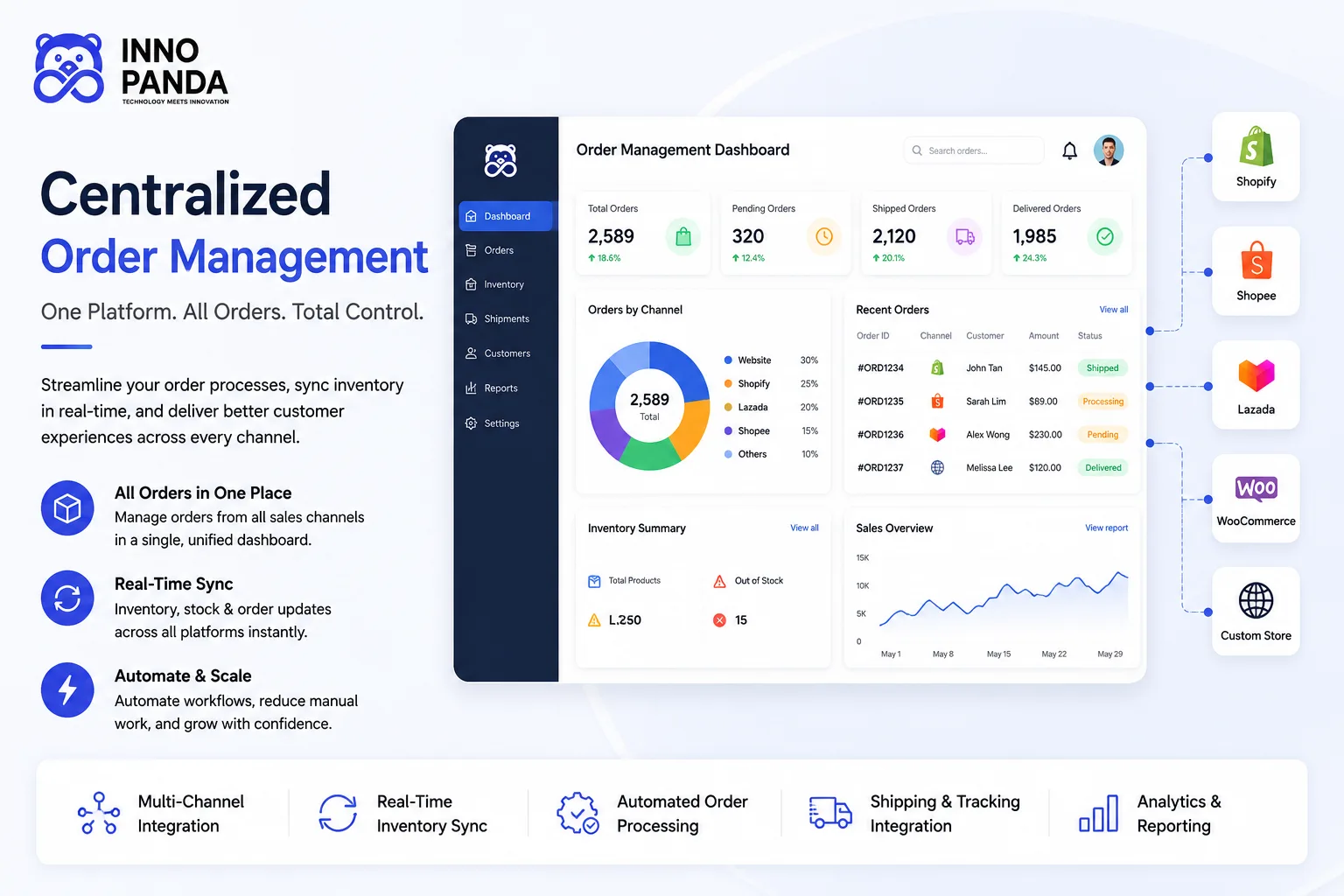
Managing orders from Shopify, WooCommerce, marketplaces, and other sales channels separately usually ends the same way: missed orders, mismatched stock, and a team stuck doing manual work that software should be doing instead. Here's what centralized order management software actually does, how it works, what it costs, and how to choose the right one.
Key Takeaways
- Centralized order management software brings orders from every sales channel into one dashboard, instead of leaving your team to check each channel separately.
- A proper order management system covers the full order journey: capture, validation, inventory allocation, routing, fulfilment, shipping, and returns.
- It's not the same as an inventory system, a WMS, or an ERP, though the four often work alongside each other.
- Multichannel sellers, especially those juggling Shopify, WooCommerce, Amazon, and Southeast Asian marketplaces, tend to feel the need for centralized order management earliest.
- Cash on delivery, flash-sale order surges, and multi-courier delivery are three things most OMS guides skip, and three things that matter a lot for sellers in this region.
- Pricing depends on your order volume, channel count, and integrations, not a single flat number.
- The right choice depends on your channels, warehouse setup, and order volume, not which platform has the longest feature list.
Managing orders from Shopify, WooCommerce, marketplaces, and other sales channels separately can lead to missed orders, mismatched inventory, manual busywork, and slower fulfilment. Every extra channel adds another dashboard to check, another place an order can get overlooked, and another opportunity for your stock numbers to fall out of sync.
Centralized order management software is built to fix exactly that. This guide covers what it is, how it works, the features worth checking before you buy, what it costs, and how a platform like SyncingAbout fits into the picture for sellers across Singapore and the wider region.
What Is Centralized Order Management Software?
In plain terms, centralized order management software takes every order coming in from every channel you sell on and brings it into a single system. Instead of logging into Shopify, then Lazada, then Shopee, then Amazon to see what's been sold, you check one dashboard. That's centralized order processing in a nutshell: one workflow standing in for what used to be several disconnected ones.
What Does an Order Management System Do?
An order management system, or OMS, follows an order through its entire life, from the moment it's placed through to the moment it's delivered, and beyond that if it ever gets returned. It's the connective layer between your sales channels, your stock, and your fulfilment process.
Centralized vs Manual Order Management
| Manual Process | Centralized Order Management Software |
|---|---|
| Multiple dashboards | One dashboard |
| Manual stock updates | Automated synchronization |
| Higher error risk | Reduced manual errors |
| Separate inventory per channel | Centralized inventory visibility |
| Manual order processing | Automated workflows |
How Does Centralized Order Management Work?
Behind that one dashboard is a fairly consistent sequence of steps, whether the order came from your own website or a marketplace.
Order Capture
Orders from Shopify, WooCommerce, Amazon, Shopee, Lazada, TikTok Shop, and any other connected channel are pulled into one system as soon as they're placed.
Order Validation
Payment status, customer details, and product information are checked before the order moves any further down the line.
Inventory Allocation
The system checks that stock is actually available and reserves it against that order, so it can't be sold twice.
Order Routing
The order is assigned to the warehouse or fulfilment location that makes the most sense, based on stock and location.
Picking and Packing
Warehouse staff pick the item, pack it, and prepare it for handover to a courier or delivery partner.
Shipping and Tracking
The order connects to a shipping carrier, generates tracking information, and keeps the customer updated automatically.
Delivery and Post-Order Management
Once delivered, the order isn't necessarily closed. Returns, refunds, and exchanges are tracked through the same system.
Why Do E-commerce Businesses Need Centralized Order Management Software?
Managing Orders Across Multiple Sales Channels
Selling through Shopify, WooCommerce, Amazon, Shopee, Lazada, and TikTok Shop all at once means orders are arriving from six different directions. Without a shared system, someone has to manually check each one, and it's easy for an order to get missed on a busy day.
Preventing Inventory Mismatches and Overselling
When each channel works off its own stock number, a sale on one platform doesn't immediately show up on another. That gap is exactly where overselling happens, and it's the same problem centralized order management is built to close through real-time synchronization.
Reducing Manual Order Processing
Copying order details between spreadsheets, marketplaces, and a fulfilment sheet is slow, repetitive, and easy to get wrong. Automating that work frees up hours every week.
Improving Order Accuracy
When order, payment, and stock data all live in one connected system, there are fewer places for a number to get typed incorrectly or copied over wrong.
Managing Growing Order Volumes
A process that works fine at 20 orders a day usually breaks down at 200. Centralized order management is what lets that growth happen without needing to add headcount at the same pace.
Key Features of Centralized Order Management Software
Unified Order Dashboard
Every order from every channel, visible in one place.
Real-Time Order Synchronization
Orders and stock updates reach every channel as they happen.
Multi-Channel Integration
Connects your website, marketplaces, and social commerce channels.
Centralized Inventory Visibility
One accurate stock count feeding every connected channel.
Automated Order Processing & Routing
Orders move through validation and warehouse assignment on their own.
Multi-Warehouse Management
Route each order to whichever location makes sense.
Split Orders & Backorder Management
Handle partial shipments and out-of-stock items without manual tracking.
Shipping & Carrier Integration
Connect to couriers and generate labels and tracking automatically.
Order Tracking
Real-time status visibility for your team and your customers.
Returns, Refunds & Exchanges
Track the full reverse journey, not just the outgoing order.
Analytics & Reporting
Order volume, fulfilment speed, and channel performance in one view.
API & Third-Party Integrations
Connects to accounting, shipping, and other tools your business already uses.
Benefits of Centralized Order Management Software
Save Time
Less manual order entry, more time on growing the business.
Reduce Order Errors
Fewer manual touchpoints means fewer mistakes.
Prevent Overselling
One accurate, shared stock count across every channel.
Improve Inventory Visibility
One clear view instead of several separate half-pictures.
Speed Up Fulfilment
Orders route and process automatically, without waiting on manual review.
Improve Customer Experience
Accurate stock, faster shipping, and clearer tracking for buyers.
Simplify Multi-Channel Operations
One workflow instead of a separate process for every channel.
Scale Your E-commerce Business
Handle more orders and channels without a proportional rise in manual work.
Centralized Order Management for Multi-Channel E-commerce
A centralized OMS is meant to connect your website, marketplaces, social commerce, warehouses, and shipping partners into one operational flow. What that looks like varies a bit by channel.
Shopify Order Management
Orders placed on a Shopify store sync into the same system as every other channel, so Shopify sales and marketplace sales are processed the same way rather than as two separate workflows.
WooCommerce Order Management
The same principle applies to a WooCommerce store: orders and stock changes flow into the central system instead of staying isolated on your WordPress site.
Amazon Order Management
Amazon orders bring their own rules around performance metrics and fulfilment methods, which makes keeping Amazon in sync with your other channels especially important, not optional.
Shopee, Lazada, and TikTok Shop Order Management
For sellers across Singapore, Malaysia, Indonesia, Vietnam, and the Philippines, these regional marketplaces often carry more order volume than a standalone website. Centralizing their orders alongside Shopify or WooCommerce matters even more here, particularly during regional flash sales.
Exact channel support varies by provider, so always confirm which platforms a given order management system actually integrates with before committing.
Centralized Order Management vs Other Systems
Order management software often gets confused with a few related systems. Here's how they actually differ.
| System | What It Actually Manages |
|---|---|
| Order Management System (OMS) | The full order journey across every sales channel, from capture to delivery and returns |
| Inventory Management System (IMS) | Stock levels and SKU tracking, often feeding into the OMS rather than replacing it |
| Warehouse Management System (WMS) | What happens physically inside a warehouse, like bin locations and picking routes |
| Enterprise Resource Planning (ERP) | A much broader system covering finance, HR, and operations, sometimes with order management as one module |
In practice, these systems usually work alongside each other rather than replacing one another. A growing multichannel seller often ends up needing inventory and order management software working as one connected pair rather than two separate tools, which is exactly the overlap covered in our guide to multichannel inventory management software.
Order Management and Accounting: Keeping Financial Records in Sync
There's a financial side to every order that's easy to overlook: each sale eventually needs to show up correctly in your books, with the right tax treatment for the channel and country it came from.
Why Order Data Needs to Reach Your Accounting System
Recreating invoices by hand from six different channel dashboards is slow, and it's exactly the kind of repetitive task where numbers get typed wrong. When order data flows automatically into your accounting system, revenue, fees, and refunds line up with what actually happened on each channel, instead of needing to be reconstructed at month-end.
Common Accounting Integrations to Look For
Connections to tools like Xero or QuickBooks are worth checking for specifically, since they're what most small and mid-sized sellers already use for bookkeeping. An order management system that pushes sales data into your accounting tool automatically turns reconciliation from a recurring chore into something that mostly runs itself.
What Is Distributed Order Management?
Distributed order management, or DOM, is a more advanced layer on top of centralized visibility. Instead of just knowing that stock exists somewhere, it decides exactly where an order should be fulfilled from.
DOM looks at which warehouse has the stock, which location is closest to the customer, and which fulfilment option best meets the delivery promise, then routes the order accordingly. Put simply: centralized order visibility plus intelligent distributed fulfilment is what makes multi-warehouse operations run efficiently instead of chaotically.
Order Routing and Multi-Warehouse Fulfillment
What Is Automated Order Routing?
Automated order routing assigns each incoming order to a fulfilment location without a person having to decide manually every time.
How Does Order Routing Work?
The system checks stock availability, delivery distance, and any business rules you've set, such as prioritising a specific warehouse, then sends the order there automatically.
Multi-Warehouse Inventory Allocation
When stock for the same SKU sits in more than one warehouse, the system needs to know exactly how much is where, not just a combined total, so it can route orders correctly.
Split Shipments and Partial Fulfillment
Sometimes a single order needs to ship from two locations, or ship in two parts because one item isn't available yet. A capable OMS handles that without turning it into a manual exception.
Backorders and Out-of-Stock Products
When an item isn't available, the system should flag it as a backorder rather than letting the sale go through and quietly become a problem later.
Handling Order Surges During Flash Sales and Peak Seasons
A normal Tuesday and 11.11 are not the same test for an order management system. Flash sales like 11.11, 12.12, and 9.9, plus festive peaks around Chinese New Year, Hari Raya, and year-end holidays, can push a week's worth of orders into a few hours.
What Happens to Order Management During a Traffic Spike
Order capture, validation, and stock allocation all have to keep pace with a sudden jump in volume. If any one of those steps slows down or falls behind, orders start queuing, stock numbers lag behind actual sales, and the gap between "sold" and "confirmed available" is exactly where overselling creeps in.
Automated Order Management vs Manual Review During Peak Periods
Manual review works fine at normal volume, where someone can glance at each order before it moves forward. During a spike, that same manual step becomes the bottleneck. Automated order management removes the person from the everyday path, applying the same validation and routing rules automatically no matter how many orders arrive in the same minute.
Preventing Duplicate and Failed Orders at Scale
High-traffic moments also raise the odds of duplicate submissions, payment timeouts, and stock allocation clashes between two near-simultaneous orders. A system built for volume checks for these automatically, rather than leaving a person to catch them after the fact.
Returns, Refunds and Exchanges Management
A complete order management system doesn't stop at delivery. Returns are common enough in e-commerce that skipping this part of the workflow leaves a real gap. A good OMS tracks the return request, manages approval, coordinates the reverse shipment, processes the refund or exchange, and updates inventory once the item is confirmed back in stock, so returned stock doesn't just disappear from your records.
Managing Cash on Delivery (COD) Orders Across Southeast Asia
Most order management guides are written with prepaid checkout in mind. That's a gap for sellers here, since cash on delivery still accounts for a large share of orders in Indonesia, the Philippines, and Vietnam, and it behaves very differently from a card payment that's confirmed the moment the order is placed.
Why COD Complicates Centralized Order Management
With a prepaid order, payment confirmation happens instantly, so inventory can be allocated with confidence. With COD, the order is placed, but payment only happens on delivery, sometimes days later, and sometimes not at all if the buyer refuses the parcel. That delay means stock gets tied up against orders that aren't guaranteed to complete.
Reducing Fake and Fraudulent COD Orders
Because there's no upfront payment to confirm intent, COD channels tend to see more fake or impulsive orders that are never actually collected. Basic checks like phone number verification, order history flags for repeat non-collections, and confirmation calls or messages before dispatch all help filter these out before they tie up stock and a courier's time.
Tracking Return-to-Sender (RTS) and Failed Deliveries
A parcel that comes back as return-to-sender still needs its stock restored and its order status updated correctly, the same as any other return. Left untracked, RTS orders are an easy way for a stock count to quietly drift from reality, especially at volume.
Last-Mile Courier and Delivery Partner Integration
Fulfilment doesn't end when an order leaves the warehouse. How it gets to the customer's door, and how reliably, is its own part of the order management picture.
Why Multichannel Sellers Need More Than One Courier
One courier rarely covers every area, price point, and delivery speed a multichannel seller needs. It's common across the region to work with more than one delivery partner, whether that's a national postal service, a regional courier such as J&T Express or Ninja Van, or an on-demand service for same-day delivery in major cities.
What to Look for in Courier Integration
Look for automatic label generation, live tracking updates that reach the customer without manual follow-up, and the ability to choose a courier per order based on destination or cost, rather than locking every order to a single delivery partner regardless of fit.
When Does Your Business Need Order Management Software?
Not every seller needs this on day one. These are the signals worth watching for:
- You sell on multiple channels already
- Your order volume is steadily increasing
- Inventory is frequently mismatched between channels
- Employees are processing orders manually across separate dashboards
- You manage more than one warehouse or fulfilment location
- Returns are becoming difficult to track accurately
- Your business is expanding into new marketplaces
If a few of these already sound familiar, that's usually a sign manual order management has quietly become a bottleneck.
How to Choose the Right Centralized Order Management Software
Check Supported Sales Channels
Confirm it actually connects to the channels you sell on, not just the ones listed on the homepage.
Evaluate Inventory Synchronization
Ask how often stock updates run and what happens when a sync fails.
Check Order Automation Features
How much of the order journey runs on its own versus needing manual review.
Evaluate Warehouse Management
Whether it supports the number of locations you actually operate.
Check Shipping Integrations
Confirm it connects to the couriers you already use.
Check Returns Management
Make sure reverse logistics is actually built in, not bolted on as an afterthought.
Evaluate API and Integration Capabilities
Whether it connects cleanly to your accounting and other existing tools.
Check Reporting and Analytics
Depth and usefulness of the data you'll actually rely on day to day.
Consider Scalability
Whether it holds up as your order volume grows, not just at today's numbers.
Evaluate Security and User Permissions
Role-based access so staff only see and edit what their job requires.
How Much Does Centralized Order Management Software Cost?
There's no single price across the market, since most providers price around a few factors specific to your business:
- Number of orders processed per month
- Number of sales channels connected
- Number of users on the account
- Number of warehouses or fulfilment locations
- Integrations and API requirements
- Level of automation and support included
Common Order Management Software Pricing Models
Most providers price using one of a handful of common structures: a flat monthly subscription, per-order pricing, per-user pricing, tiered plans based on volume, or custom enterprise pricing for larger operations. The best way to compare is to request a quote based on your actual order volume and channel count rather than relying on a generic "starting from" figure.
Centralized Order Management Software for Singapore Businesses
Singapore's e-commerce sellers are often multichannel by default, running a Shopify or WooCommerce store alongside Shopee, Lazada, and increasingly TikTok Shop. For a Singapore-based business managing multiple fulfilment locations, centralized order management is less of a nice-to-have and more of an operational necessity once order volume climbs past what one person can track manually.
Order and customer data handled through an OMS also falls under Singapore's Personal Data Protection Act, so it's worth confirming how a provider secures and stores that data as part of your evaluation, not just its feature list.
Centralized Order Management for Malaysia and Southeast Asia
The same challenge shows up across Malaysia, Indonesia, Vietnam, and the Philippines, where sellers frequently juggle several regional marketplaces at once rather than a single dominant channel. The priority across the region tends to be the same: one connected view of orders and stock across every marketplace you sell on, rather than a system built primarily around a single Western platform with everything else added on as an afterthought.
Why Choose SyncingAbout for Centralized Order Management?
SyncingAbout is built around the exact problem this guide covers: bringing orders and inventory from more than one sales channel into a single, connected operational environment.
Centralized Order Management
SyncingAbout brings orders from your connected sales channels into one place, so your team works from a single view instead of switching between platforms.
Multi-Channel Synchronization and Operations
Orders and stock updates flow between your connected channels, keeping availability consistent as you add more places to sell.
Inventory Synchronization
Stock levels stay aligned with order activity, which is what keeps overselling from becoming a recurring problem rather than a one-off mistake.
Order Processing
Orders move through validation and fulfilment as part of one connected workflow instead of a separate manual process per channel.
Reporting & Visibility
A centralized view of order and stock activity, so decisions are based on what's actually happening across your business, not a partial picture from one channel.
SyncingAbout is part of the same team behind Inno Panda, a Singapore-based digital agency, which is why the product is built around solving real operational bottlenecks for regional sellers rather than adding another generic dashboard. For sellers building a broader multi-channel ecommerce business, order management is usually the piece that needs to be right before everything else scales cleanly.
Centralized Order Management Software: Is It Right for Your Business?
| Business Situation | OMS Relevance |
|---|---|
| One channel, very low order volume | May not need advanced order management yet |
| Multiple sales channels | Strong use case |
| Frequent inventory mismatches | Strong use case |
| Multiple warehouses | Strong use case |
| High manual order workload | Strong use case |
| Rapidly growing e-commerce operation | Strong use case |
The honest answer is that not every business needs a full centralized OMS right away. It earns its place once channels, order volume, or warehouse complexity start outpacing what a small team can track by hand.
Quick Glossary
- OMS (Order Management System)
- Software that manages an order's full journey, from capture through fulfilment, shipping, and returns.
- DOM (Distributed Order Management)
- The process of deciding which warehouse or location should fulfil an order when stock exists in more than one place.
- WMS (Warehouse Management System)
- Software that manages physical operations inside a warehouse, such as bin locations, picking routes, and staff tasks.
- ERP (Enterprise Resource Planning)
- A broader business system covering finance, HR, and operations, sometimes including order management as one module.
- Backorder
- An order placed for a product that's temporarily out of stock, to be fulfilled once new stock arrives.
- Split Shipment
- An order fulfilled from more than one location, or shipped in separate parts because not all items were available together.
- Reverse Logistics
- The process of moving a returned item back from the customer to the seller or warehouse.
- COD (Cash on Delivery)
- A payment method where the customer pays for the order when it's delivered, rather than at checkout.
- RTS (Return to Sender)
- A parcel that's sent back to the seller because it couldn't be delivered or the customer refused to accept it.
Frequently Asked Questions About Centralized Order Management
What Is Centralized Order Management Software?
It's software that pulls orders from every sales channel you use into one system, so you can see, process, and fulfil them from a single dashboard instead of checking each channel separately.
What Is an Order Management System?
An order management system, or OMS, is the software that tracks an order's full journey, from the moment it's placed to payment, inventory allocation, fulfilment, shipping, and any return that follows.
How Does Centralized Order Management Work?
It captures orders from every connected channel, validates payment and product details, checks inventory, routes the order to the right warehouse, and keeps shipping and tracking information updated in one place.
What Are the Benefits of Centralized Order Management?
Less manual work, fewer order errors, less overselling, faster fulfilment, and one clear view of every order and stock level across all your sales channels.
Can Order Management Software Manage Multiple Sales Channels?
Yes, that's the core purpose of a centralized OMS. It's built to pull orders from channels like Shopify, WooCommerce, Amazon, and regional marketplaces into one connected workflow, though exact channel support varies by provider.
Can Order Management Software Prevent Overselling?
It reduces the risk significantly by keeping a shared, real-time stock count across every channel, so a sale on one platform updates availability everywhere else immediately rather than after a delay.
Can an OMS Manage Multiple Warehouses?
Most centralized order management platforms support multi-warehouse routing, sending each order to whichever location has stock and makes sense for delivery time, rather than defaulting to just one warehouse.
What Is the Difference Between OMS and WMS?
An OMS manages the order itself, from capture to fulfilment to delivery, across all your sales channels. A WMS manages what happens physically inside one warehouse, such as bin locations and picking routes.
What Is the Difference Between OMS and ERP?
An OMS focuses specifically on order and fulfilment workflows. An ERP is a much broader system covering finance, accounting, HR, and operations, with order management sometimes as just one module inside it.
What Is Distributed Order Management?
Distributed order management, or DOM, decides where an order should be fulfilled from when stock exists in more than one location, choosing the warehouse that best balances stock availability and delivery distance.
Can OMS Software Manage Returns and Refunds?
Yes, most centralized order management platforms track the full return journey, from the return request through approval, reverse logistics, refund or exchange, and updating inventory once the item is back in stock.
How Much Does Order Management Software Cost?
Pricing depends on your order volume, number of sales channels, number of users, and which integrations you need, so it's best to compare quotes against your own setup rather than a generic starting price.
How Does Order Management Software Handle Flash Sales?
It automates order validation and stock allocation so a sudden spike in orders, like during 11.11 or 12.12, is processed at the same speed and accuracy as a normal day, instead of relying on manual review that can't keep pace.
What Is COD Order Management?
It's how an order management system handles cash on delivery orders, where payment isn't confirmed until the parcel is delivered, including flagging likely fake orders and tracking parcels that come back as return-to-sender.
Does Order Management Software Integrate With Accounting Software?
Many platforms connect to accounting tools like Xero or QuickBooks, pushing order and revenue data across automatically so it doesn't need to be re-entered by hand for bookkeeping.
How Do I Choose the Right OMS?
Check which sales channels and warehouses it actually supports, how it handles inventory sync and returns, what reporting it offers, and whether it can scale with your order volume before comparing price.
Final Takeaway: Build a Centralized Order Management Strategy That Scales
Manage orders, inventory, and fulfilment from a centralized system instead of switching between multiple platforms, and most of the operational strain that comes with multichannel selling quietly disappears. More channels and more orders don't have to mean more manual work; they just mean the workflow needs to be connected instead of scattered.
As your order volume grows, the gap between a manual process and a centralized one only gets wider. Getting order management right early is what keeps that growth from turning into a fulfilment headache later.
Ready to Simplify Multi-Channel Order Management?
Manage orders, inventory, and fulfilment from a centralized system instead of switching between multiple platforms. See what that looks like for your business.