AI in apps has grown up. Our iOS and Android team breaks down which AI features are worth paying for, how to build them, and when to hold off.
Not long ago, “AI in the app” meant a chat bubble in the corner that couldn’t answer much beyond your opening hours. Things look very different now. The apps we’ve been building lately use AI that books, checks, fills in forms and follows up on its own, and only bothers the user when it actually needs a decision. If an app is on your plan for this year, this guide walks through what’s changed, which AI features are worth the money, and how to build them without wasting your budget.
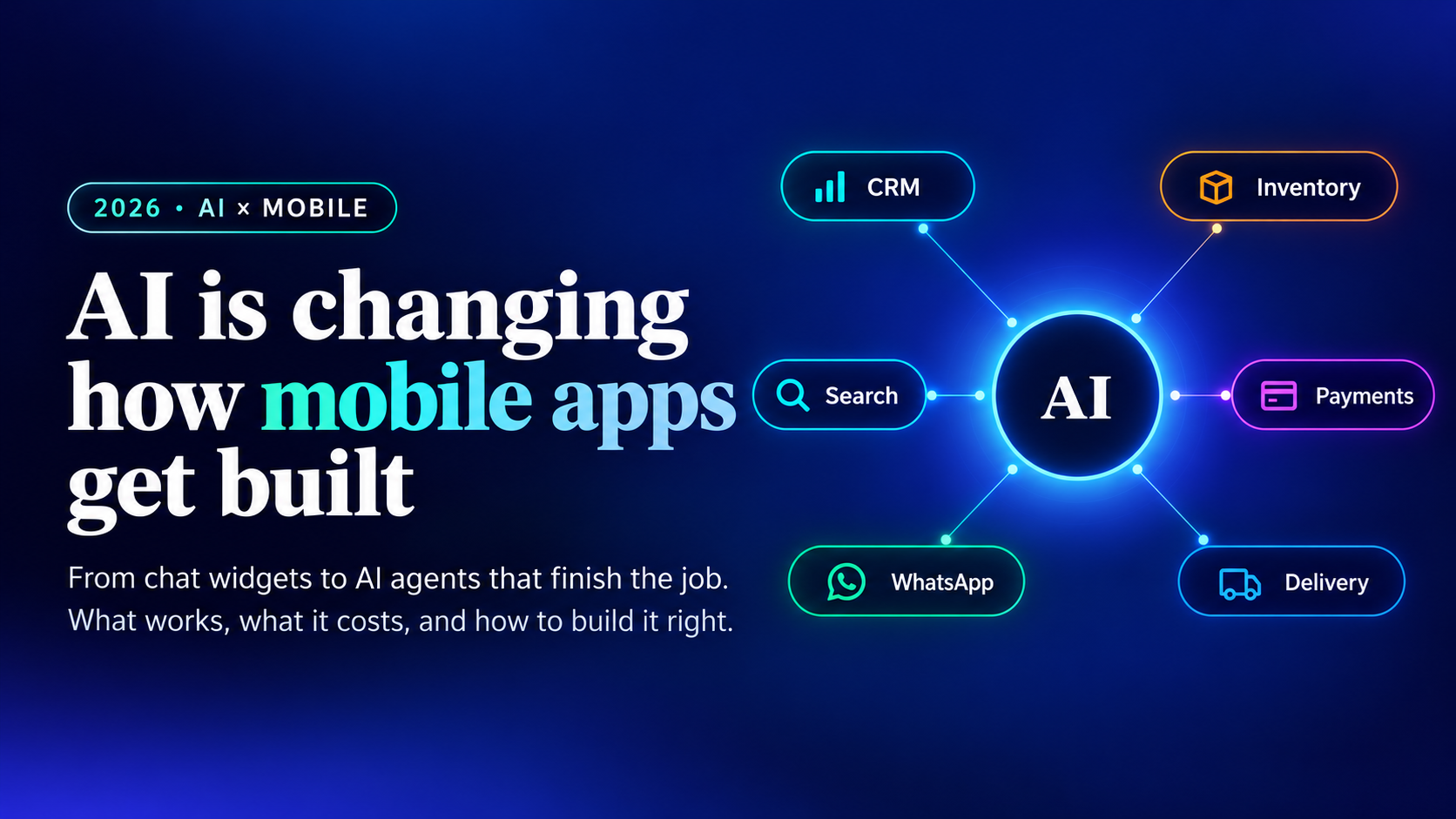
How AI agents are changing mobile app development in 2026 for businesses in Singapore and Southeast Asia
When clients ask us about adding AI, they usually picture a recommendation strip or a chatbot. Both are useful, but both stop at the suggestion, and the user still does the rest. An agent doesn’t stop there. Tell it what you need and it plans the steps, talks to the systems it’s connected to, checks its own work, and only then comes back to you.
We often use this example in client meetings. A customer wants running shoes under $100. A recommendation feature shows them twelve options and leaves them to sort out size, loyalty points, address and payment on their own. An agent narrows it down to shoes that are in stock in their size, applies the points, uses the saved address and asks one question: “Place the order?” Same customer, same request, a lot less effort.
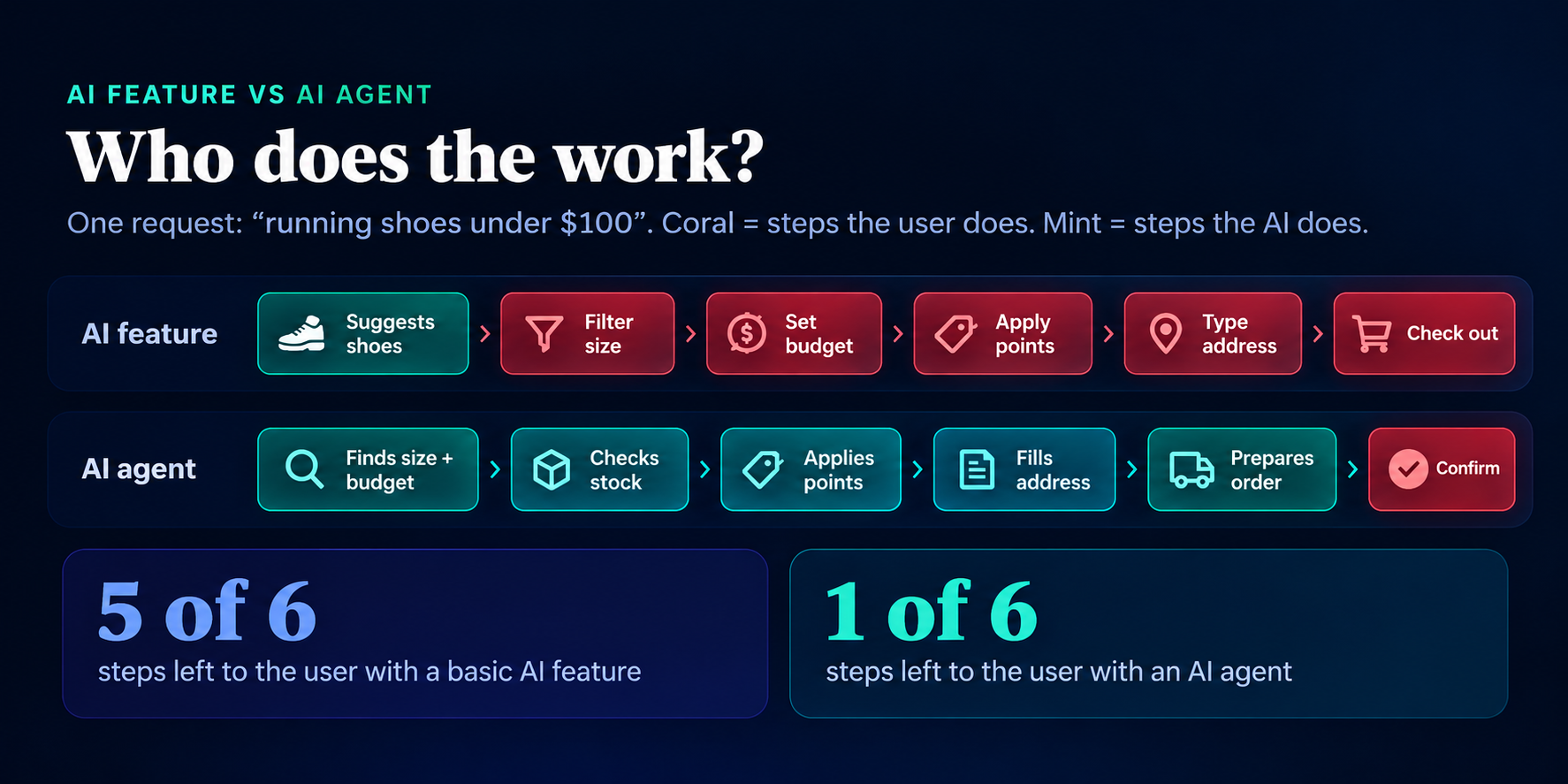
AI feature vs AI agent in a mobile app: the agent completes the task, the feature only suggests
What makes agents different is that they chase a result. You don’t walk them through each step. In a single flow, one agent might look up a customer in the CRM, adjust stock, check where their parcel is and drop them a WhatsApp message. Over time it also notices which offers and send times actually get replies, and adjusts.
That said, not every app needs an agent. We’ve advised clients against one more than once, because a single, well-placed AI feature solved the actual problem at a fraction of the cost. The user’s problem should decide the approach.
Lots of AI features look brilliant in a demo and then do nothing for the business once they’re live. The ones we’d actually recommend save money, bring in more sales or make the app clearly easier to use. Six of them keep showing up in our projects.
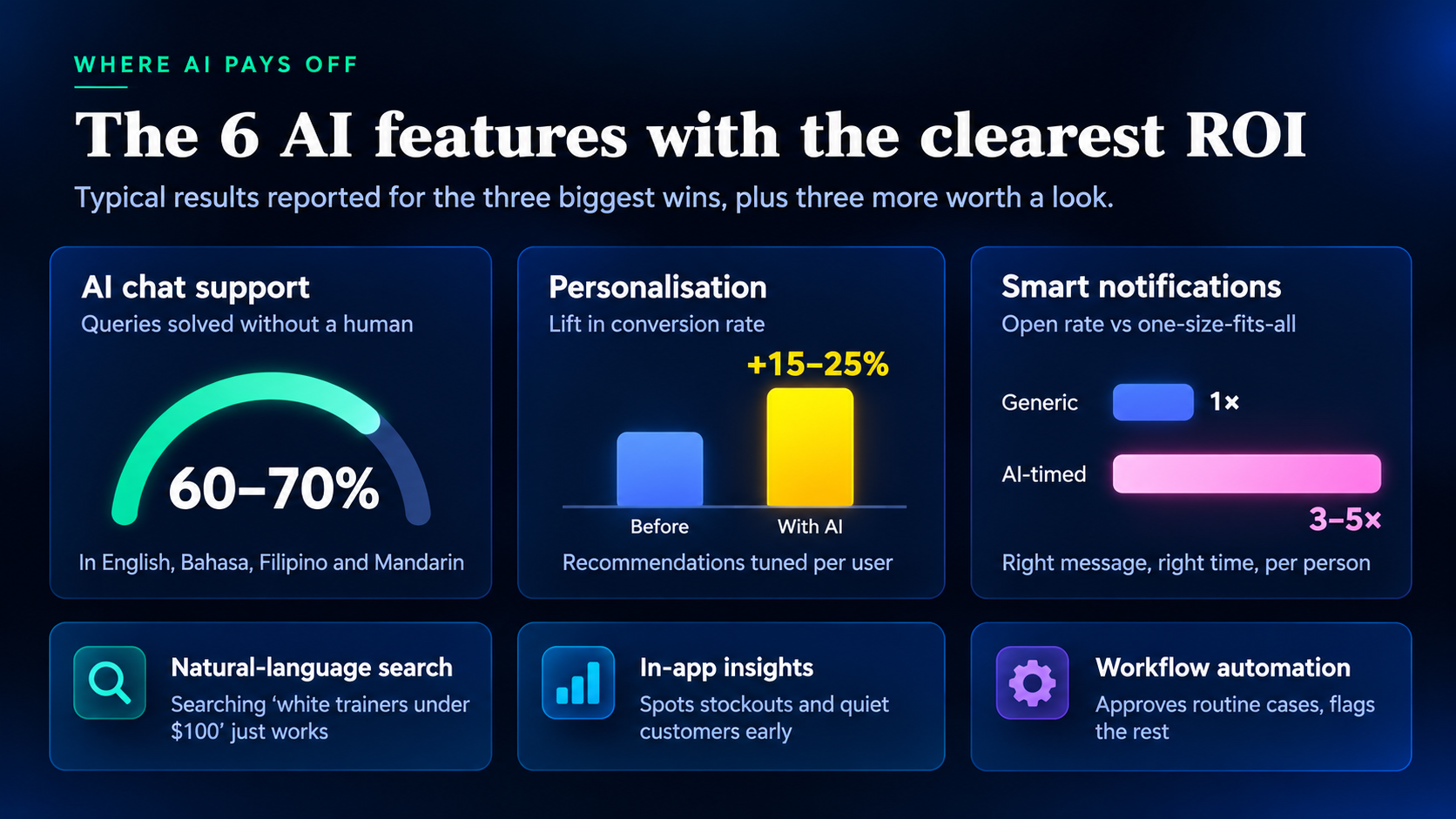
Six AI mobile app features with the clearest ROI in 2026
The old chatbots mostly sent you round in circles. The newer ones are a lot smarter. A customer types “where’s my order?” and the assistant checks the actual order, sees it’s stuck at the warehouse, and tells them when it’ll go out. It can reply in Bahasa, Filipino, or Mandarin as easily as in English, which helps a lot in this part of the world. In many apps, 60 to 70% of questions get sorted without anyone from the team stepping in.
Two people open the same shopping app. One always buys protein powder on Sunday nights. The other browses shoes at lunch and never checks out. A personalized app treats them differently and shows each of them what they’re likely to want at the time they’re likely to want it. After a few weeks of tuning, conversions going up by 15 to 25% is quite normal.
Think about how many app notifications you swipe away without reading. That’s what happens when everyone gets the same message at the same time. With AI deciding who gets what and when, open rates three to five times higher aren’t unusual. In markets like Indonesia and the Philippines, where phones buzz all day, the gap is even wider.
Nobody types neat filters. They type “running shoes for a half marathon under $100.” AI search handles that, and the same trick works for help articles or digging up an old order. Fewer dead ends means fewer people giving up.
No one has time to stare at dashboards all day. So the app speaks up instead: “This item sells out in about six days at this rate.” “Three of your top ten customers haven’t ordered in a month.” Little heads-ups like these catch trouble early.
If your app handles applications or approvals, AI can run the routine ones against your rules, approve what’s clearly fine, and hand the odd ones to a real person. Fintech, logistics, and professional services teams save hours with this.
Why bother planning for this now? Mostly because of how apps are built. Decisions made in the first few months, about data, APIs and structure, quietly decide what AI you can add later. If those are planned well, adding a feature next year is a few weeks’ work. If not, you’re often looking at a rebuild.
Conversation becomes an interface. Many tasks that take five screens today will be done by typing or saying what you need, with the app taking care of the rest. Regular screens aren’t going away, but for a growing number of tasks a conversation will be the starting point. We’re seeing this first in fintech, healthcare, and logistics.
More AI on the phone itself. AI models are now small enough to run directly on a phone. Responses are near-instant, features still work without a connection, and personal data doesn’t have to leave the device. With data protection rules getting stricter across the region, that privacy benefit is becoming a deciding factor for many clients.
Camera, voice and text working together. Picture a technician snapping a photo of a broken pump. The app spots the fault, suggests the replacement part and writes up the job report. Voice is a big one here too, since plenty of users would rather talk than type.
AI is speeding up how apps get built, too. Coding assistants, AI test tools and design generators are cutting development time and cost. It’s worth asking any development partner whether they use them, because a team that doesn’t may be charging you more for the same work.
Personal by default. People are used to Netflix and Grab knowing what they like. They’re starting to expect the same from the apps they use for work, and an app that treats everyone identically is going to feel dated pretty quickly.
On paper it looks a lot like any other app project. The catch is that a handful of early choices, mostly around data, make the difference between AI that helps and AI that just sits there. This is the order we work in.
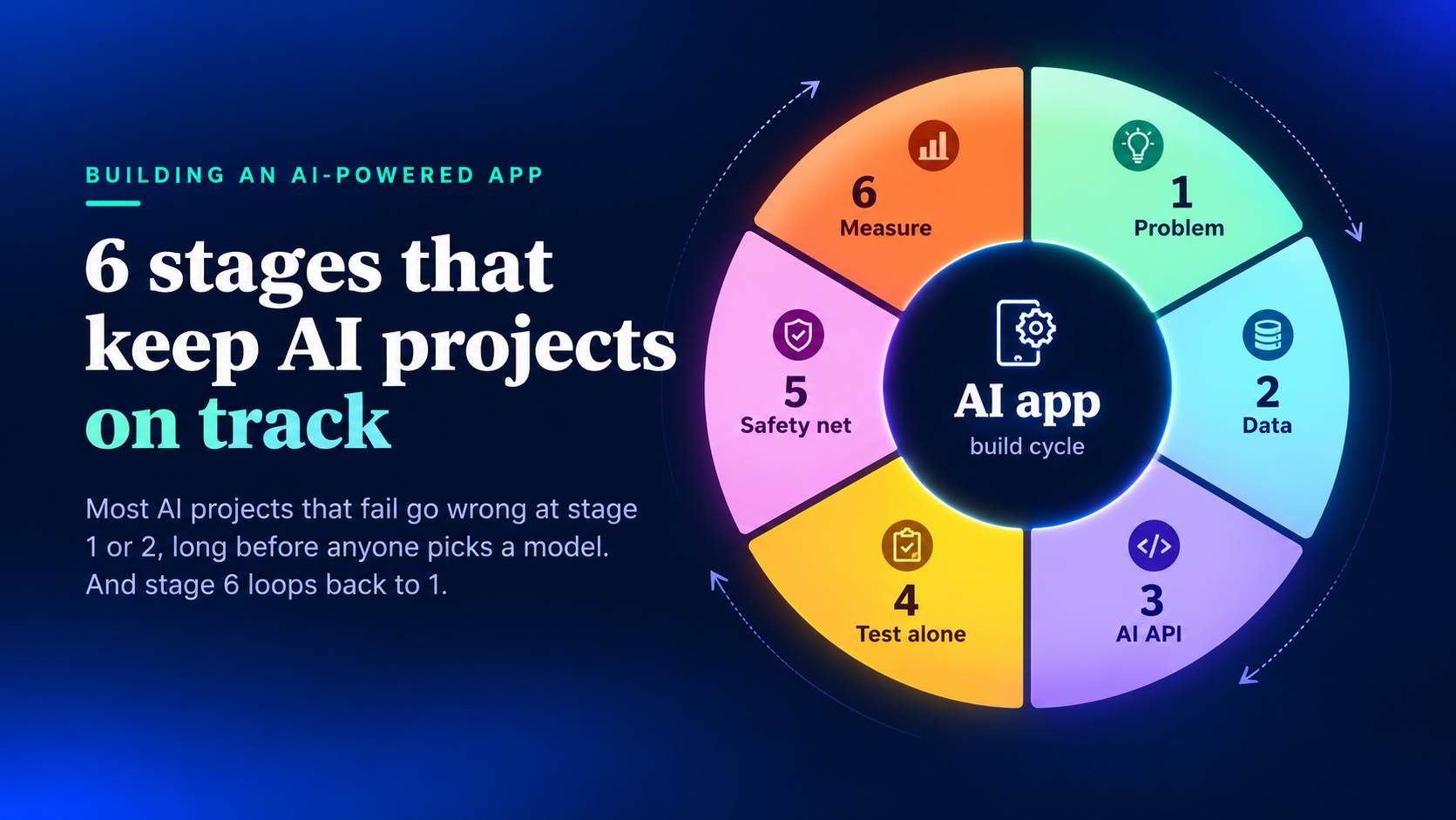
How to build an AI-powered mobile app in six stages
“We want AI” isn’t a brief. “Our customers spend about 90 seconds hunting for a product, and we’d like that under 20”. With a problem that specific, picking the tech is the easy bit, and later on you can tell whether it worked.
AI is only as good as what it learns from. So before coding starts, we agree on which user actions the app records and where that information lives. We’ve seen perfectly good AI models give rubbish answers simply because the data behind them was patchy.
Training your own model sounds impressive, but for most small and mid-sized businesses it’s money down the drain. Plugging into an existing model through an API is quicker and cheaper, and usually better anyway. GPT-4o or Claude handle chat and reasoning well. For anything involving images, Gemini Vision or a dedicated vision service fits better. Live recommendations can need a specialist tool of their own.
Every AI piece gets built and tested by itself first, with known inputs and the answers we expect back, before it goes anywhere near the main app. For agents that book, pay or message customers, we won’t skip this. Finding a bug after it has sent 200 wrong messages is not a fun afternoon.
It will, now and then. Sometimes it misunderstands the question. Sometimes it invents an answer and sounds very sure about it. We keep a log of what it says and does, someone on the team reads through it every week, and if the AI isn’t confident, the app hands the conversation to a person instead of guessing.
Decide what a good result looks like before you launch. It could be a third fewer support tickets. It could be more customers reordering. Then watch that number from day one. How often people open the feature is interesting, but it isn’t the point.
A lot of this comes down to who you hire. Ask a developer to show you AI that’s running in a real, live app, not a demo. Ask which AI APIs they’ve used and what they do when the AI gets something wrong. A team that knows its stuff will usually suggest a short planning phase for the AI before any building starts.
Some AI work earns its money back far faster than the rest. From what we’ve seen, two areas stand out.
AI inside a CRM. If you’re a B2B business with more than 50 or so active clients, a CRM that warns you when a client looks likely to leave, spots upsell chances and handles follow-ups often covers its cost within 6 to 12 months.
AI in online stores. Once a store is handling more than about 100 orders a month, personal recommendations and well-timed notifications tend to pay for themselves in 3 to 6 months.
We go through these four questions with clients before any AI work starts. One “no” usually means there’s something to fix first.
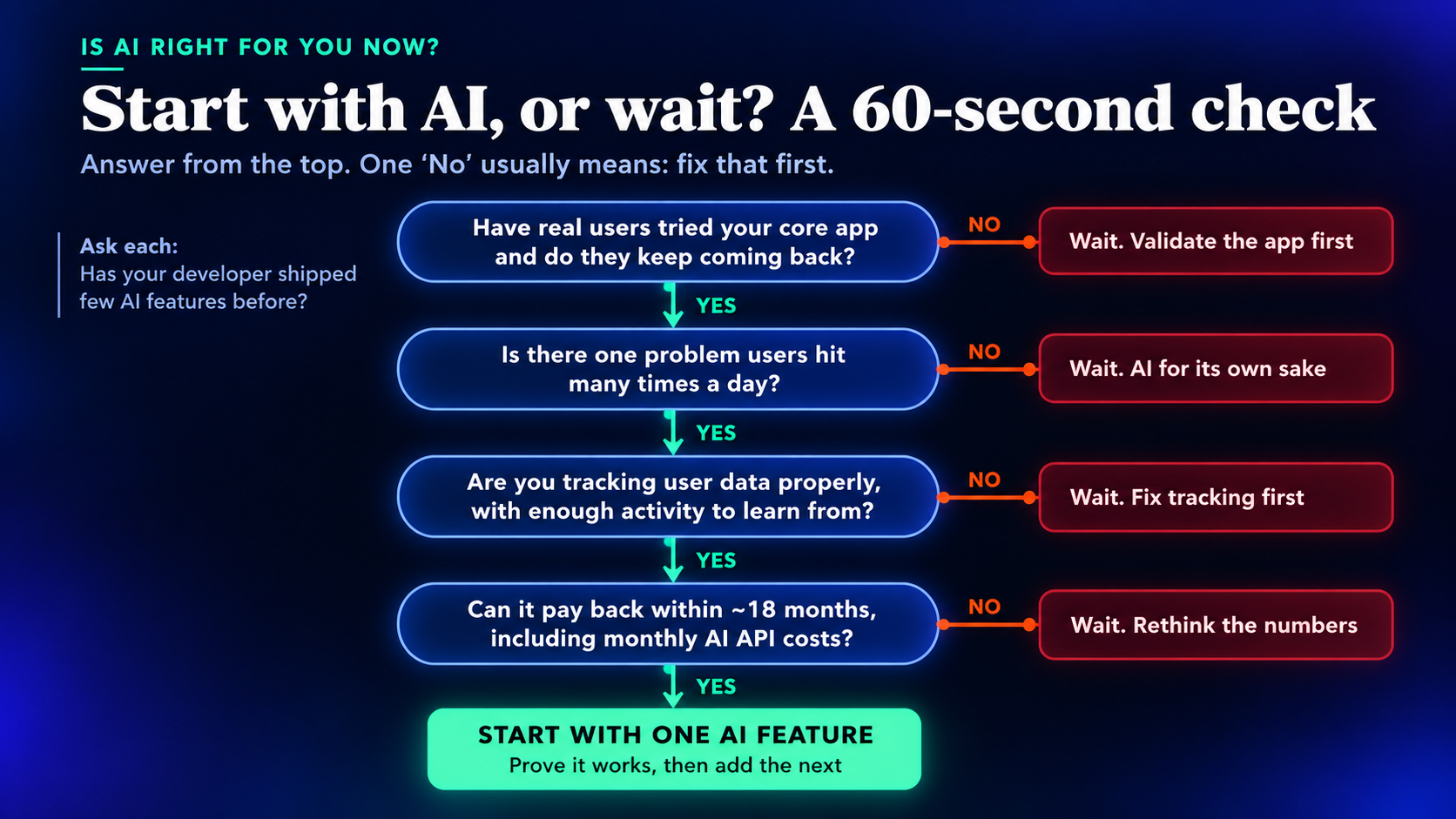
When to start with AI your mobile app and when to wait
Your users run into the same problem many times a day, and there’s enough activity in the app for the AI to learn from. The business case should pay back within about 18 months, there should be room in the budget for monthly API costs, and your development partner should have live AI work to show you.
Real users haven’t validated the core app yet, or your data isn’t being tracked properly. Hold off too if “we should add AI” is the main reason, if AI spending would take money away from getting the basic app right, or if there aren’t enough users yet for the AI to learn anything useful.
Strong mobile developers and strong AI engineers aren’t often found on the same team. That gap is where a lot of AI app projects go wrong, and it’s why we built our team to cover both. Here’s what that looks like in practice.
AI planned from the first sprint. We sort out data, tracking and API choices with AI in mind from week one, so nothing needs to be patched on later.
Part of the app, not stuck on top. We build in Flutter and React Native, and the AI lives inside the app’s own screens. It isn’t a third-party chat widget dropped into a corner.
Never tied to one AI provider. Our backend can switch between OpenAI, Gemini and Anthropic, with usage limits, backups and cost controls in place. If one provider has a bad day or puts its prices up, your app carries on.
Linked to the rest of your business. The app talks to your CRM, accounting or fulfillment software, so whatever the AI picks up lands in the right place and nobody has to type it in twice.
Results tracked from launch. Every AI feature ships with tracking for the business outcome it’s meant to improve, not just usage numbers.
Built for this region. Multiple languages, local payment and delivery integrations, patchy mobile signal and how people here actually use their phones are all part of the plan from the start.
Sometimes building isn’t the answer at all. We also have our own ready-made products: Salesman AI for sales automation, FollowUP AI for winning customers back, and CashFlow SaaS for managing finances. If one of them already handles most of what you need, say 80% or so, we’ll recommend licensing it rather than building from scratch.
For retail and eCommerce clients, recommendations and smarter search usually make the biggest difference, mainly because customers search the way they talk, typos and all. After that come AI support before and after a sale, prices that adjust to demand, and notifications that arrive when a customer usually shops.
In logistics and delivery, route planning is the obvious win. The app works around traffic, delivery windows, and how much each van can carry. The same AI can spot odd activity that might be fraud and warn you ahead of a busy week. Where coverage is patchy, as in parts of Indonesia and the Philippines, some of this has to work offline on the driver’s phone.
In logistics and delivery, route planning is the obvious win. The app works around traffic, delivery windows, and how much each van can carry. The same AI can spot odd activity that might be fraud and warn you ahead of a busy week. Where coverage is patchy, as in parts of Indonesia and the Philippines, some of this has to work offline on the driver’s phone.
For healthcare and wellness, common uses include symptom checking, triage, tracking health data over time, and personalized wellness advice. Because health data is sensitive, local healthcare regulations and privacy requirements need to shape the design from the start.
Fintech apps rely on AI for real-time fraud detection, spending insights, and reading documents for loans, insurance claims, and KYC checks. Every automated decision also needs to be explainable and properly logged for audits.
B2B and enterprise teams use it for scoring leads in the CRM, working out equipment faults from a photo, flagging risky suppliers and pushing approvals through faster.
Tools we commonly use for this work include OpenAI GPT-4o, Anthropic Claude, Google Gemini, LangChain, TensorFlow Lite, Firebase ML, AWS Bedrock, and Pinecone, along with RAG and vector search for apps that need to answer from your own documents.
In two ways. On the building side, AI tools are speeding development up noticeably. Inside the apps, agents are taking over support and routine workflows. As a result, people now expect apps to adapt to them instead of working the same way for everyone.
A regular app follows fixed rules. An AI-powered app uses machine learning or large language models to understand normal language, learn from how people use it, predict what they need and personalise what they see. The most common examples are AI chat support, smart notifications and search that understands plain sentences.
It depends mostly on how many AI features you want and how ready your data is. Adding one AI feature to an app you already have is the cheapest way in and usually takes a few weeks to a couple of months. A brand-new app built around AI costs more, and enterprise apps with lots of connected systems sit at the top end. Share your idea and feature list for a scoped estimate.
Pick the one that fixes your users' biggest frustration. For many startups that's AI chat support, smart notifications, natural-language search or recommendations. Launch one, prove it's working, then add the next.
Expect apps you can talk to instead of tap through, more AI running on the phone itself, features that mix voice, images and text, and personalisation as a basic expectation. AI will also keep bringing development costs down. Businesses that start now will have an edge that gets harder to catch up with.
Check mobile skills and AI experience separately, because they're different. Ask to see AI features that are live in real apps, how they plan data tracking, which AI APIs they've used and how they deal with wrong answers. Ideally, the mobile and AI people should work as one team.
Ideas with real demand right now include multilingual customer service for small businesses, inventory and demand forecasting, health screening and triage, AI money management, AI tutors for learning and languages, and route planning for last-mile delivery.
Yes, as long as you start small. Adding AI cha support to an app you already have is one of the cheaper ways in, and the on going API costs for a small app ae usually modest. Pick one feature that clearly helps. For some businesses an existing SaaS tool is the smarter first step, and that's fine too.
The question isn’t really whether to use AI in your app anymore. It’s how to add it in a way you can measure and that actually helps your users. The apps that win over the next few years will be the ones that get a little better every week as people use them.
Tell us about your app idea. In a free, no-obligation call, we’ll suggest the AI features that make sense, give you a realistic budget and timeline, and help you work out whether the numbers add up.
Let’s build something that moves your business forward.
60 Paya Lebar Road
#06-28 Paya Lebar Square
Singapore 409051
Monday to Friday 9am to 5pm (Closed On Public Holidays)
© 2026 Inno Panda. All rights reserved.