

10 Google Display Ads Singapore Strategies That Generate More Leads
- 1 10 Google Display Ads Singapore Strategies That Generate More Leads
- 1.1 Key Takeaways
- 1.2 What are Google Display Ads and the Google Display Network?
- 1.3 Why Google Display Ads are important for businesses in Singapore
- 1.4 Which platforms and placements run Google Display Ads?
- 1.5 What changed in 2026: Display campaigns are moving into Demand Gen
- 1.6 10 Google Display Ads Singapore Strategies That Generate More Leads
- 1.6.1 1Start with remarketing to your website visitors
- 1.6.2 2Use custom segments to reach buyers before they search
- 1.6.3 3Use Customer Match and lookalike audiences from your best customers
- 1.6.4 4Build responsive display ads with strong assets
- 1.6.5 5Give each audience one clear offer
- 1.6.6 6Send every ad to a matched, mobile-first landing page
- 1.6.7 7Exclude weak placements before they waste your budget
- 1.6.8 8Cap frequency and exclude people who already enquired
- 1.6.9 9Fix tracking and PDPA consent, then judge on cost per qualified lead
- 1.6.10 10Test Demand Gen on purpose, then scale what works
- 1.7 Google Display Ads costs and a 90-day plan for Singapore
- 1.8 Hire an expert Google Ads management team in Singapore
- 1.9 Quick glossary and frequently asked questions
- 1.10 Turn Display clicks into Singapore enquiries
Display will not replace Search, but it is the most affordable way to stay in front of buyers who have not enquired yet. Here is how to use it now that Google is moving Display into Demand Gen.

Most Singapore businesses are paying for Display clicks that never turn into enquiries. The ad is rarely the problem: Display is usually run like Search, then judged on the wrong numbers.
That problem is about to get harder to spot. In May 2026, Google announced that standalone Display campaigns are moving into Demand Gen, so the Google Display Network is now bought inside a different campaign structure. Guides written before that change still describe a campaign type that is on its way out.
Most Display advice is also global. It tells you to pick a format, upload banners and watch your reach grow. It rarely turns into a plan for a Singapore SME with an SGD budget, a PDPA duty to handle consent properly and a lead target to hit. That is the gap this guide fills.
You will get clear answers on what Google Display Ads and the Display Network are, why they matter and where they run. Then you get 10 strategies, SGD-based budget guidance, a measurement framework and a 90-day plan. It is written for business owners, marketing managers and startup founders who want qualified leads, not just impressions. If you would rather have a team run it for you, see our Google Ads management service.
Key Takeaways
- Display builds and recaptures demand. Search captures it. Use both, and judge each on its own job.
- Standalone Display campaigns are moving into Demand Gen. The Display Network inventory stays, so plan your account around Demand Gen now.
- Fix conversion tracking and consent before you spend. Without them, no strategy can be measured.
- Remarketing is the strongest use of Display for most lead generation budgets.
- Layer your audiences: website visitors, custom segments and customer lists beat broad targeting.
- Send every ad to a matched, mobile-first landing page with one clear action, such as a form or a WhatsApp tap.
- Judge Display on cost per qualified lead and assisted conversions, not on CTR alone.
What are Google Display Ads and the Google Display Network?
What are Google Display Ads?
Google Display Ads are visual ads, made of images, headlines, logos or video, that appear on websites, apps, YouTube and Gmail while people read, watch or browse. You build and buy them in Google Ads. Unlike Search Ads, they do not wait for someone to type a keyword.
What is the Google Display Network?
The Google Display Network (GDN) is the collection of places where those ads can appear. Google’s help centre describes it as more than 2 million websites, videos and apps, and says those sites reach over 90% of internet users worldwide, citing Comscore. Website and app owners join through Google tools such as AdSense, AdMob and Google Ad Manager, and they earn money when ads run next to their content.
Think of the network as one buying desk for thousands of MRT posters, bus stop panels and shop-front screens. You choose who should see your message, and Google places it where that audience is spending time.
How Google Display Ads work
Set a goal and an audience
In Google Ads, choose what you want, such as enquiries, and who should see the ad, such as people who visited your pricing page.
Upload your assets
Add images, a logo, headlines and descriptions. Google combines them to fit each placement.
Enter the auction
Each time a matching person loads a page or app in the network, your ad competes with others for the space.
Pay by your bid strategy
Depending on the campaign type, you pay per click, per thousand viewable impressions or per conversion.
Why Google Display Ads are important for businesses in Singapore
Singapore is one of the most connected markets in the world. DataReportal counted 5.78 million internet users at the end of 2025, which is 98.4% of the population. Almost every buyer you want is online, but most of them are not searching for you today.
Six reasons Google Display Ads matter for your business
Reach people before they search
Most buyers are not searching for you today. Display puts your brand in front of them while they read, watch or browse.
Pay less per click
WebFX reports that Display costs about 70% less per click than Search on average, so the same budget reaches more people.
Win back visitors who left
Remarketing reminds website visitors about your offer while they compare options.
Target by audience, not only keywords
Reach people by interest, buying intent, website behaviour or customer lists.
Build recall with visuals
Images and video make your brand easier to remember than a text ad on its own.
Make Search work harder
People who already know your brand are more likely to trust and click your Search ads, which can lift the return on your whole Google Ads budget.
What Display does well
Think of Search as a customer who walks into your shop and asks for a price. Display is the poster at the MRT station that made them remember your shop in the first place. The poster does not close the sale. It makes the later search more likely to end with you.
Display shows your ad while people read news, watch videos, check Gmail or use apps. That makes it strong at three jobs.
Remarketing
Reminds past visitors about you while they compare options. This is Display’s strongest lead job.
Defined audiences
Reaches people by interest, intent signals and customer lists before they search.
Warming up Search
Familiar brands get more clicks later, so Display lifts the return on your Search budget.
Where it is weak
Cold, standalone lead capture. A cheap click often reflects low intent.
Display also pairs well with organic growth. Visitors who arrive through search engines can be added to remarketing lists, so strong SEO services feed your Display audiences instead of competing with them.
What Display does not do well
Benchmark sources disagree on the exact numbers, but they agree on the direction. WebFX reports that Search beats Display by 5x to 10x on click-through rate and conversions, while Display costs about 70% less per click. Other benchmark sets put average Display CTR between roughly 0.05% and 1.2%. These are global averages, not Singapore promises. The lesson holds anyway: a cheap click is not a cheap lead.
| Question | Search Ads | Display Network ads |
|---|---|---|
| Buyer mindset | Actively looking for a provider | Reading, watching or browsing |
| Cost per click | Higher | Lower (about 70% lower on average, per WebFX) |
| Click-through rate | Typically 3% to 5% | Far lower, often under 1% |
| Best job | Capture ready-to-buy demand | Remarket, reach defined audiences, warm up buyers |
| Judge it by | Cost per lead | Cost per qualified lead and assisted conversions |
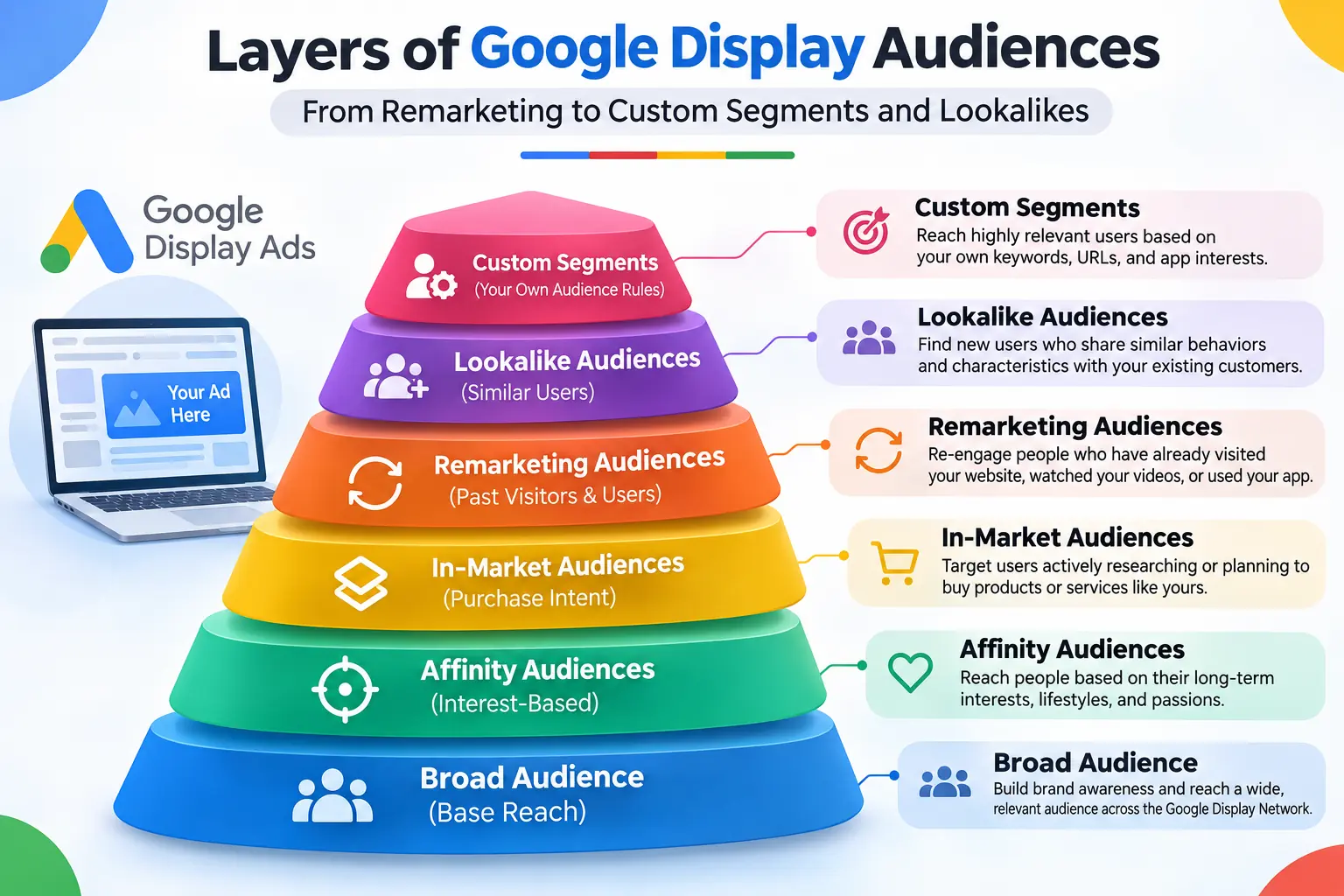
Which platforms and placements run Google Display Ads?
You buy Google Display Ads in one place, Google Ads, but they appear across several Google and partner properties. Availability depends on the campaign type. YouTube, Discover, Gmail and Maps are reached through Demand Gen.
Where Google Display Ads appear
| Placement | What people are doing there | Best use |
|---|---|---|
| Websites and blogs | Reading news, articles and reviews | Remarketing and context-based reach |
| Mobile apps | Using apps and games | Wide reach, but watch for accidental taps |
| YouTube | Watching videos | Awareness and video remarketing |
| Gmail | Checking email | Visual promotions to defined audiences |
| Google Discover | Browsing recommended content on mobile | Interest-based visuals |
| Google Maps | Looking for places nearby | Local visibility (reported to be in beta) |
The platforms and tools behind Google Display Ads
| Platform or tool | Its role |
|---|---|
| Google Ads | Where you build, target, bid on and report on Display ads |
| Demand Gen | The campaign type that now manages Display Network inventory |
| Google Tag Manager and Google Analytics | Track enquiries and build remarketing audiences |
| AdSense, AdMob and Google Ad Manager | Publisher tools that supply website and app space to the network |
| Your CRM and customer list | First-party data for Customer Match and lookalike audiences |
Google Display Ad formats
The main formats are responsive display ads, where Google mixes your images, headlines and descriptions, plus uploaded image ads, Gmail ads, video ads and, inside Demand Gen, carousel ads. Prepare landscape, square and portrait images and a square logo so your ads can fit any placement.
What changed in 2026: Display campaigns are moving into Demand Gen
In May 2026, Google announced that it is retiring Display as a standalone campaign type. The inventory is not going away. Display Network placements now sit inside Demand Gen campaigns, next to YouTube, Discover, Gmail and Maps inventory. A migration tool began appearing in eligible accounts in June 2026, and the shift is expected to run through 2027.
What this means for your account
Existing Display campaigns stay editable until they are migrated. After that, Google says remaining eligible campaigns will be moved automatically. Industry guides report that the migration tool carries over 42 days of performance history, which shortens relearning to about one or two days. You can still serve only on Display Network inventory by using Demand Gen channel controls.
| Area | Standalone Display | Demand Gen |
|---|---|---|
| Where ads run | Display Network only | Display Network, YouTube, Discover, Gmail and Maps |
| Formats | Responsive display ads | Image, video and carousel ads |
| Display-only delivery | Built in | Possible through channel controls |
| Future updates | No separate roadmap | New Display features ship here |
Plan the move, do not rush it: industry guides report that migration cannot be undone. Test with a smaller campaign first, compare cost per lead for two to four weeks, then move your best performer. Check your own account for the exact dates that apply to you.
Everything in the strategies below still applies. The audience, creative, tracking and measurement rules work the same way whether you run them in a Display campaign today or in Demand Gen tomorrow.
10 Google Display Ads Singapore Strategies That Generate More Leads
These 10 strategies show how to use Google Display Ads in Singapore to bring in enquiries, not just impressions. For each one you will see how to do it, why it works and a tip for the Singapore market. They apply to Display campaigns today and to Demand Gen as Google moves Display Network inventory there.
Part 1 · Reach the right people
1Start with remarketing to your website visitors
Most visitors leave your website without enquiring. Display remarketing shows them your offer again on websites, apps and YouTube while they compare suppliers, so your brand is familiar when they are ready to decide. For most Singapore businesses, it is the most dependable use of Google Display Ads for lead generation.
How to do it
- Install the Google tag through Google Tag Manager and link Google Analytics so your audience lists start filling.
- Create separate lists for all visitors, service-page visitors, pricing-page visitors and people who started a form but did not submit it.
- Give each list its own message, such as a free consultation for people who abandoned the form.
- Exclude people who have already enquired, so you do not pay to advertise to existing leads.
Remarketing reaches people who have already shown interest, so it usually turns more impressions into enquiries than cold audiences do. It also builds the lists that most of the other strategies below depend on.
2Use custom segments to reach buyers before they search
Custom segments let you build a Display audience from the words people search for and the websites they visit. For example, you can reach people who search for “google ads agency singapore” or who browse industry websites, and show them your ads while they are still researching.
How to do it
- Add the buying keywords you already use in Search, such as your service name with “hire”, “quote” or “price”.
- Add the URLs of industry and competitor websites so Google can find people who browse similar pages.
- Keep each segment tight, with one service per segment, so your ad message can match the audience.
- Run the segment as a small test next to your remarketing campaign and compare both on cost per qualified lead.
Custom segments turn what you have learned in Search into audience targeting on the Google Display Network. You reach people with similar intent earlier in their search for a supplier, without relying on broad interest groups.
3Use Customer Match and lookalike audiences from your best customers
Your CRM already holds your best audience data. Customer Match lets you upload a list of customers or leads so Google can match it to signed-in users. Google can then use your best list as a signal to find similar people, through lookalike segments in Demand Gen or optimised targeting in Display campaigns.
How to do it
- Export a clean list of past customers and qualified leads from your CRM, with email addresses or phone numbers.
- Upload only data you have permission to use, and ask your legal adviser to check your consent wording under the PDPA.
- Use the list to exclude existing customers from prospecting, or to promote a new offer to them.
- Seed lookalike segments or optimised targeting with your best list, then compare them against your manual audiences.
First-party data is the clearest signal you own about who becomes a good customer. Building audiences from it helps Display find people who look like your best buyers, instead of anyone who happens to browse a website.
Part 2 · Turn impressions into enquiries
4Build responsive display ads with strong assets
Responsive display ads let you upload several images, headlines and descriptions, and Google combines them to fit each placement. They save time, but weak assets produce weak ads, so the quality of what you upload decides the result.
How to do it
- Upload both landscape (1.91:1) and square (1:1) images, plus a square logo, so your ads fit every placement.
- Write several short headlines, one long headline and several descriptions. Include your service, a clear benefit and an action.
- Use real photos of your team, work or product instead of generic stock images, and keep text on images to a minimum.
- Review asset ratings after a few weeks and replace the weakest images and headlines.
On Display, your ad competes with the page around it, and the image is what people notice first. Clear, varied assets let Google find the best combination for each audience and placement.
5Give each audience one clear offer
Display ads interrupt people who are busy reading, watching or using an app. A vague “learn more” ad rarely earns a click, so your message needs to fit where each audience is in the buying journey.
How to do it
- Cold audiences: offer something low-commitment, such as a guide, checklist or free audit.
- Warm remarketing audiences: offer a stronger step, such as a free consultation or quote.
- Form abandoners: send a short reminder that makes it easy to finish, or offer a WhatsApp chat.
- Use one call to action per ad, such as “Get a free quote” or “Chat on WhatsApp”.
When the offer matches the audience’s intent, you get better clicks and fewer wasted ones. It also lets you compare audiences fairly, because each one is tested with a message built for it.
6Send every ad to a matched, mobile-first landing page
A strong ad sent to a slow or generic page wastes the click you paid for. Each Display audience should land on a page that repeats the promise the ad just made. If you need help building one, see our landing page design service.
How to do it
- Repeat the ad’s headline and offer at the top of the page so visitors know they are in the right place.
- Keep a single action: one form, one phone number or one WhatsApp button.
- Add proof near the action, such as reviews, client logos and clear pricing guidance.
- Make the page fast on mobile (our website speed optimisation service can help), because many Display clicks come from phones.
Display visitors are often earlier in their decision than Search visitors, so they need a quick reason to trust you and a simple next step. A matched page gives them both.
Part 3 · Protect your budget
7Exclude weak placements before they waste your budget
The Google Display Network covers more than 2 million websites, videos and apps, and not all of them bring leads. Accidental taps in apps and low-quality sites can use up spend without producing a single enquiry.
How to do it
- Open the Placements report every week in the first month and sort it by spend.
- Exclude sites and apps that spend heavily but bring no qualified leads, or show suspicious click patterns.
- Use content and app-category exclusions to keep your ads away from games and topics that do not suit your brand.
- Save your exclusions at account level so new campaigns start with a clean list.
Placement control is one of the biggest differences between a Display account that quietly leaks money and one that produces leads. Every excluded poor placement moves budget to better ones.
8Cap frequency and exclude people who already enquired
In a small market, the same people can see your Display ads again and again. Too many impressions annoy people, wear out your creative and push up your cost per lead.
How to do it
- Set a frequency cap, and start with about three to five impressions per person per week.
- Create an audience of people who have already enquired and exclude it from your campaigns.
- Check the frequency column in your reports and lower the cap if clicks fall while impressions rise.
- Refresh your images and headlines every few weeks so the same people do not keep seeing the same ad.
Remarketing works when it feels like a helpful reminder, not a chase. Controlling frequency keeps your brand welcome and keeps your budget for people who have not yet enquired.
Part 4 · Measure and scale
9Fix tracking and PDPA consent, then judge on cost per qualified lead
Without conversion tracking, Display looks like a stream of cheap clicks with no results. With it, you can see which audiences, ads and placements produce real enquiries, and Google can optimise toward them.
How to do it
- Track form submissions, phone calls and WhatsApp clicks, and mark only real leads as primary conversions. You can improve results further with conversion rate optimisation.
- Use a consent banner that holds your ad tags until visitors agree, and ask your legal adviser to review your setup. This is general information, not legal advice.
- Report cost per qualified lead and assisted conversions next to CTR, because Display often helps a sale earlier in the journey.
- Allow 2 to 4 weeks of data before you make big changes, and 30 to 60 days before you judge the return.
Display CTR is far lower than Search CTR, so it is the wrong score for this channel. Cost per qualified lead and assisted conversions show whether Display is doing its job.
10Test Demand Gen on purpose, then scale what works
Google is moving standalone Display campaigns into Demand Gen, where Display Network inventory now sits next to YouTube, Discover, Gmail and Maps. You do not need to rush the move, but you should plan it. If you would like help, see our Google Ads management service.
How to do it
- Record what works in your best Display campaign: audiences, assets and cost per qualified lead.
- Launch a smaller Demand Gen campaign with the same audiences and compare cost per lead for two to four weeks.
- Use channel controls if you want to limit delivery to Display Network inventory.
- Move your best performer only after the test, because industry guides report that migration cannot be undone.
- Move budget to the audiences that bring qualified leads, and consider Target CPA once you reach 30 to 50 conversions a month.
The audience, creative, tracking and measurement rules in this guide still apply in Demand Gen. A planned test protects your results and keeps your account ready as new Display features ship there.
Where your budget goes matters more than how much of it you have.
Google Display Ads costs and a 90-day plan for Singapore
How much do Google Display Ads cost in Singapore?
There is no official Singapore price list for Display, because cost depends on your audience, placements and competition. Global benchmarks put Display click costs well below Search, but a lower click cost only helps if the leads are real. Plan around cost per qualified lead instead. These ranges are the same planning figures we use for Google Ads management in Singapore, not quotes.
Your 90-day Display plan
Build
Set up tracking and consent, build remarketing lists, launch one prospecting campaign with two or three tight audiences, and connect each ad group to a matched landing page.
Prune
Review the placements report, exclude weak sites and apps, replace the weakest creative and compare audiences on cost per qualified lead.
Scale
Move budget to the audiences that bring qualified leads, test lookalikes from your best customers and consider Target CPA once your conversion volume allows it.
Common Google Display Ads mistakes to avoid
- Judging Display on CTR instead of cost per qualified lead
- Launching with no conversion tracking or consent banner
- Targeting all of Singapore with no audience layers
- Sending clicks to the homepage instead of a matched page
- Ignoring the placements report until the budget is gone
- Migrating your best campaign to Demand Gen without a test
Hire an expert Google Ads management team in Singapore
Display works best when tracking, audiences, creative and reporting are handled together. Inno Panda is a Singapore digital agency that manages Google Ads campaigns, including Search, Display and Performance Max, for businesses across Singapore, Malaysia, Indonesia and the Philippines.
Signs it is time to get help: no clear cost per qualified lead, tracking you do not trust, a healthy CTR with few enquiries, a Demand Gen move to plan, or no time for weekly reviews.
What our Google Ads management service covers
- Strategy: the right mix of Search, Display and Demand Gen
- Tracking: forms, calls and WhatsApp taps
- Consent: PDPA-ready tagging for Singapore visitors
- Audiences: remarketing, custom and lookalike segments
- Landing pages: ad-matched page direction
- Reporting: cost per qualified lead, not vanity metrics
Questions to ask any Google Ads agency
- Will the ad account sit in my name?
- How will you test conversion tracking before launch?
- Will you report cost per qualified lead?
- How do you handle PDPA consent for remarketing?
- What is your plan for the move to Demand Gen?
- Is the fee flat or a share of ad spend?
Ready to see where your Display budget is going? We will review your setup and recommend where to start.
Quick glossary and frequently asked questions
Glossary: terms used in this guide
- Display Network
- Google’s network of more than 2 million websites, videos and apps where visual ads can run.
- Demand Gen
- Google’s visual campaign type, which now also manages Display Network inventory.
- Remarketing
- Showing ads to people who already visited your website or app.
- Customer Match
- Uploading a consented customer list so Google can target or model similar people.
- Assisted conversion
- A conversion where an ad helped earlier in the journey but did not get the final click.
Frequently asked questions
What are Google Display Ads?
Google Display Ads are visual ads that appear across the Google Display Network, a group of more than 2 million websites, videos and apps. They reach people while they read, watch or browse, rather than while they search.
What is the Google Display Network?
The Google Display Network is the group of more than 2 million websites, videos and apps where Google Display Ads can appear. Google says it reaches over 90% of internet users worldwide, citing Comscore.
Why are Google Display Ads important for business?
They reach people before they search, cost less per click than Search on average, and let you remarket to past visitors. Used together with Search, they keep your brand familiar until buyers are ready to enquire.
Where do Google Display Ads appear?
They appear on websites and apps in the Google Display Network, and through Demand Gen they also run on YouTube, Discover, Gmail and Maps. You buy them in one place, Google Ads.
Are Google Display Ads good for lead generation in Singapore?
Yes, when you use them for the right job. They work best for remarketing and warm audiences, and they support Search by keeping your brand in front of buyers. On their own, cold Display traffic usually produces fewer leads than Search.
Is Google retiring Display Ads?
Google is retiring the standalone Display campaign type, not the Display Network. Display inventory now runs inside Demand Gen campaigns, and Google expects the migration to continue through 2027.
How much should a Singapore business spend on Display Ads?
Most SMEs start with SGD 1,000 to 3,000 a month across Search and Display, then adjust with data. A common test split is about 65% Search, 20% remarketing and 15% prospecting. Treat this as a planning range, not a quote.
What is a good CTR for Display Ads?
Display CTR is far lower than Search. Benchmark sources range from about 0.05% to about 1.2%, so judge Display on cost per qualified lead and assisted conversions instead.
Do I need consent to run remarketing in Singapore?
The PDPC expects consent when cookies collect personal data for targeted advertising. Use a consent banner that holds ad tags until people agree, and ask your legal adviser to review your setup. This is general information, not legal advice.
What is the difference between Display and Demand Gen?
Display is the older campaign type that served ads on the Display Network only. Demand Gen serves visual ads across the Display Network, YouTube, Discover, Gmail and Maps, and it now manages Display inventory too.
How long does it take for Display Ads to produce leads?
Remarketing can produce enquiries within the first few weeks, once your audience lists fill up. Allow 2 to 4 weeks of data before you make big changes, and 30 to 60 days before you judge the return.
Turn Display clicks into Singapore enquiries
Display works when it has a clear job: recapture visitors, reach defined audiences and keep your brand familiar until people are ready to search. Build tracking and consent first, move to Demand Gen on purpose and judge results on cost per qualified lead. If you want a team to build and manage it, Inno Panda can set up your Google Ads from strategy to reporting.
Talk to Our TeamView Google Ads Services